Activity Registration Wizard
Feature Detail
Description
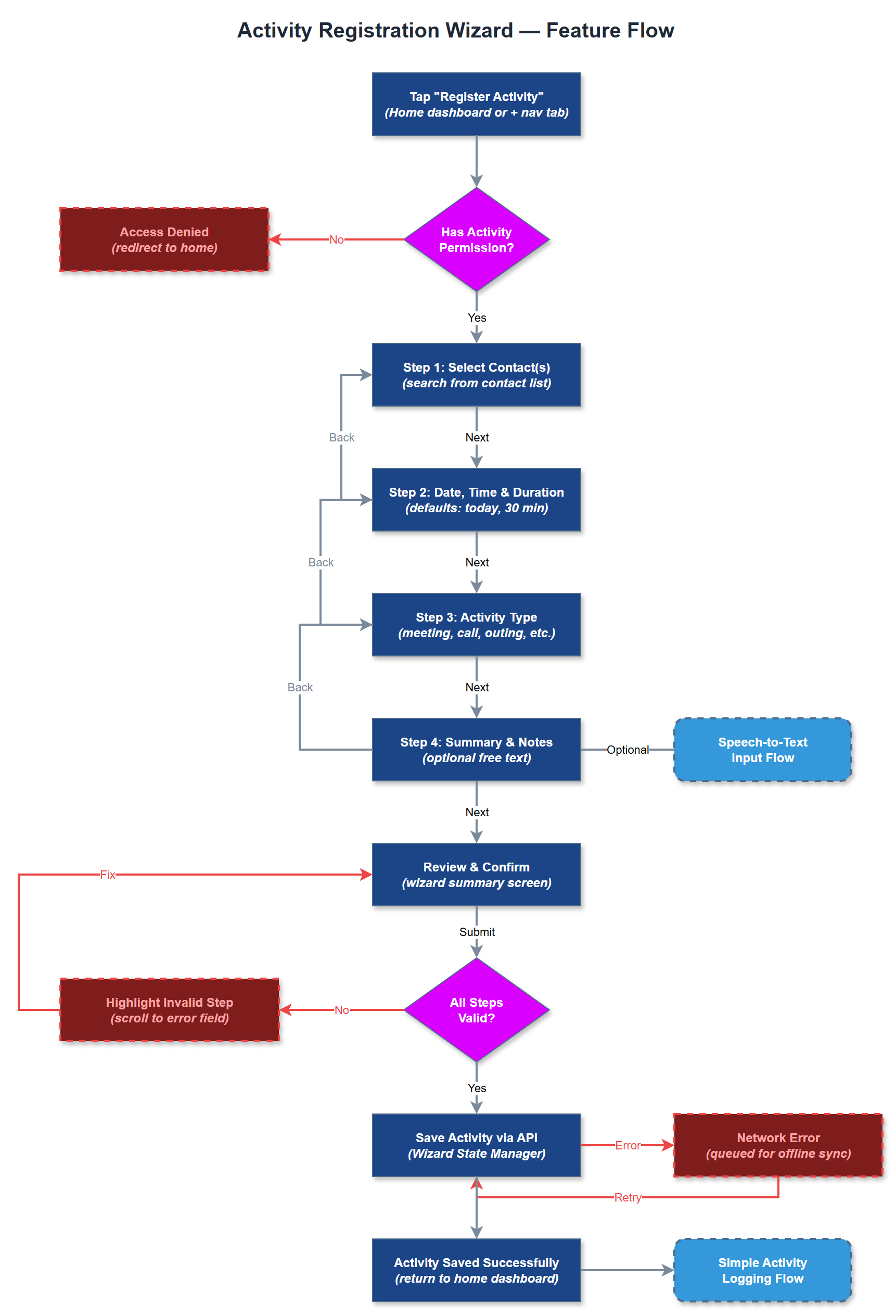
The Activity Registration Wizard provides a guided multi-step flow for registering activities that require more structured input than the quick log allows - for example, activities involving multiple contacts, specific location data, detailed notes, or document attachments. The wizard breaks the registration into discrete, validated steps (contact selection → date/time/duration → activity type → summary/notes) so that users are never overwhelmed by a single long form. State is preserved between steps so the user can navigate back without losing input.
User Flow
Analysis
Not all activities fit the quick-log pattern. Group events, home visits with structured reporting (as required by Blindeforbundet), and activities requiring document attachments need a more thorough registration path. Providing a wizard ensures data completeness for these cases, which directly improves the quality of Bufdir reports and reduces the need for coordinators to follow up on incomplete records. Organisations that require formalised post-visit report structures (helsetilstand, kursinteresse, hjelpemiddelsituasjon) depend on this feature to capture that structured data consistently.
The wizard is implemented as a Flutter Navigator 2.0 page stack managed by the Wizard State Manager service, which holds the in-progress registration as an immutable state object updated via BLoC events. Each step is a self-contained widget that emits validation events before allowing forward navigation. The Activity Form Validator service enforces field-level and cross-field rules (e.g., end time must be after start time). On final submission the complete activity payload is assembled and posted to the REST API via the Activity Service. Deep-link support allows coordinators to pre-populate the wizard with a contact ID when registering on behalf of someone else. All steps must meet WCAG 2.2 AA including keyboard-navigable focus order.
Components (41)
Shared Components
These components are reused across multiple features
Service Layer (9)
Data Layer (12)
Infrastructure (7)
User Stories
No user stories have been generated for this feature yet.