Talking Cards Toolbox
Feature Detail
Description
The Talking Cards Toolbox provides peer mentors with a curated digital collection of conversation-starter cards designed to facilitate structured, meaningful interactions with their contacts. These cards offer prompts, topics, and guided questions that help peer mentors navigate sensitive or difficult conversations in a supportive and structured way. The toolbox is designed to reduce the anxiety and uncertainty peer mentors may feel when initiating conversations about health, wellbeing, or personal challenges, giving them a reliable resource they can reference during or before a session with a contact.
User Flow
Analysis
Talking cards address a real gap in peer mentor preparation and confidence. Many peer mentors, especially those newer to the role, find it difficult to initiate or guide sensitive conversations without structured support. By providing a digital toolbox of conversation prompts, the platform equips peer mentors with tools that improve interaction quality and contact outcomes. This directly supports the core mission of the platform - enabling effective peer mentorship - and reduces attrition among volunteers who feel underprepared. From an organizational perspective, standardized conversation tools also help ensure a baseline quality of peer support interactions across all organizations using the platform.
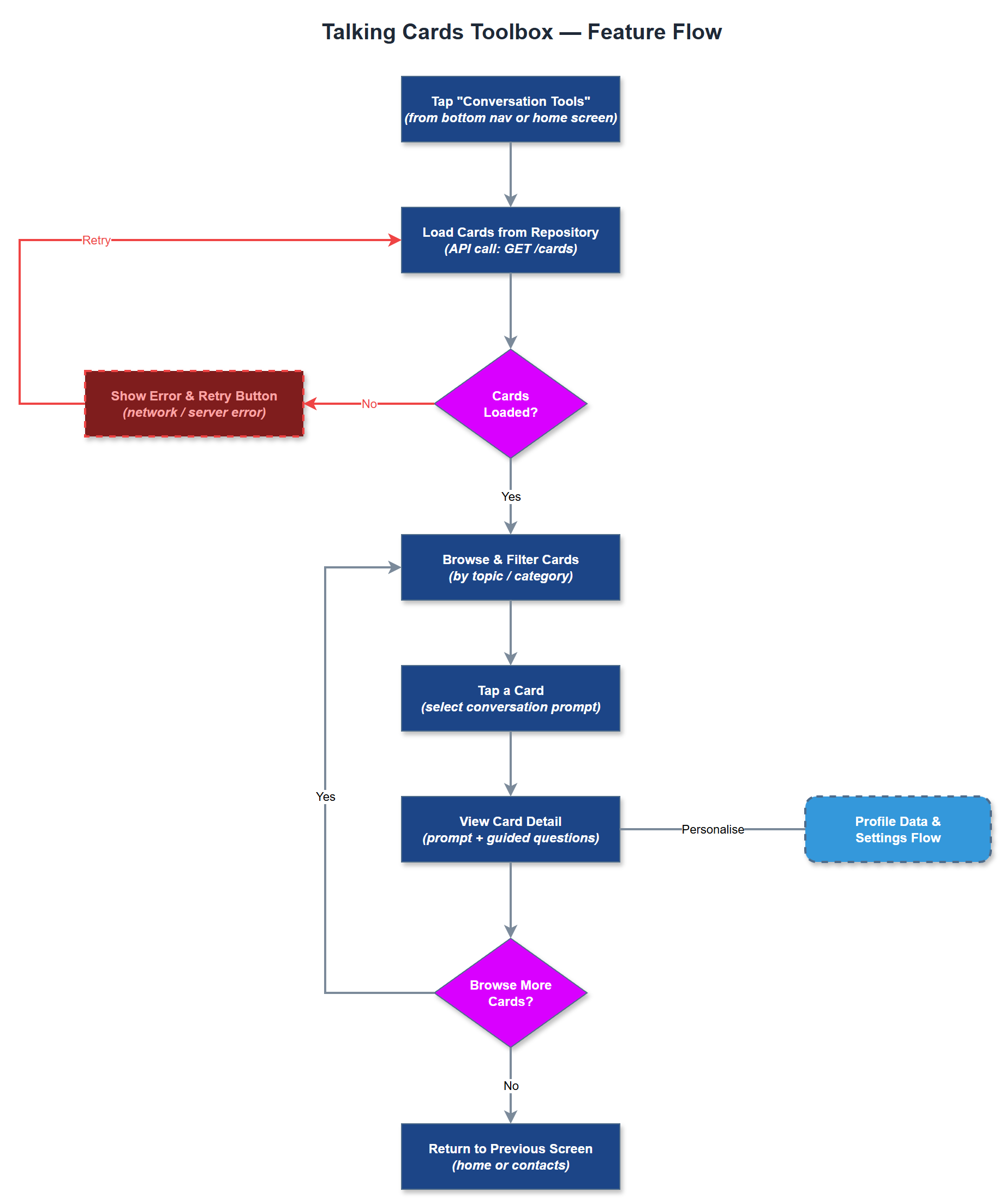
The feature can be implemented as a read-only card browser with a local or remotely fetched card dataset stored as structured JSON or fetched via the REST API. Cards are organized by topic or conversation theme and rendered as scrollable, accessible card components using Flutter widgets conforming to WCAG 2.2 AA standards. The dataset can be organization-specific or shared across tenants, with a feature flag controlling visibility per organization. No offline sync is strictly required for MVP of this feature, but caching the card set locally improves reliability in low-connectivity environments. Future iterations could allow coordinators to add custom cards via the admin portal.
Components (35)
Shared Components
These components are reused across multiple features
Service Layer (9)
Data Layer (12)
Infrastructure (7)
User Stories
No user stories have been generated for this feature yet.