Speech-to-Text Input
Feature Detail
Description
Speech-to-Text Input enables peer mentors to dictate free-text fields - primarily the activity summary and notes fields - instead of typing. The feature is triggered by a microphone icon on any compatible text field and uses the device's on-device speech recognition engine (iOS Speech framework / Android SpeechRecognizer) to transcribe speech to text in real time. The transcribed text is inserted into the field and can be edited before saving. Recording is explicitly post-activity only; no ambient recording during conversations is permitted or supported by design.
User Flow
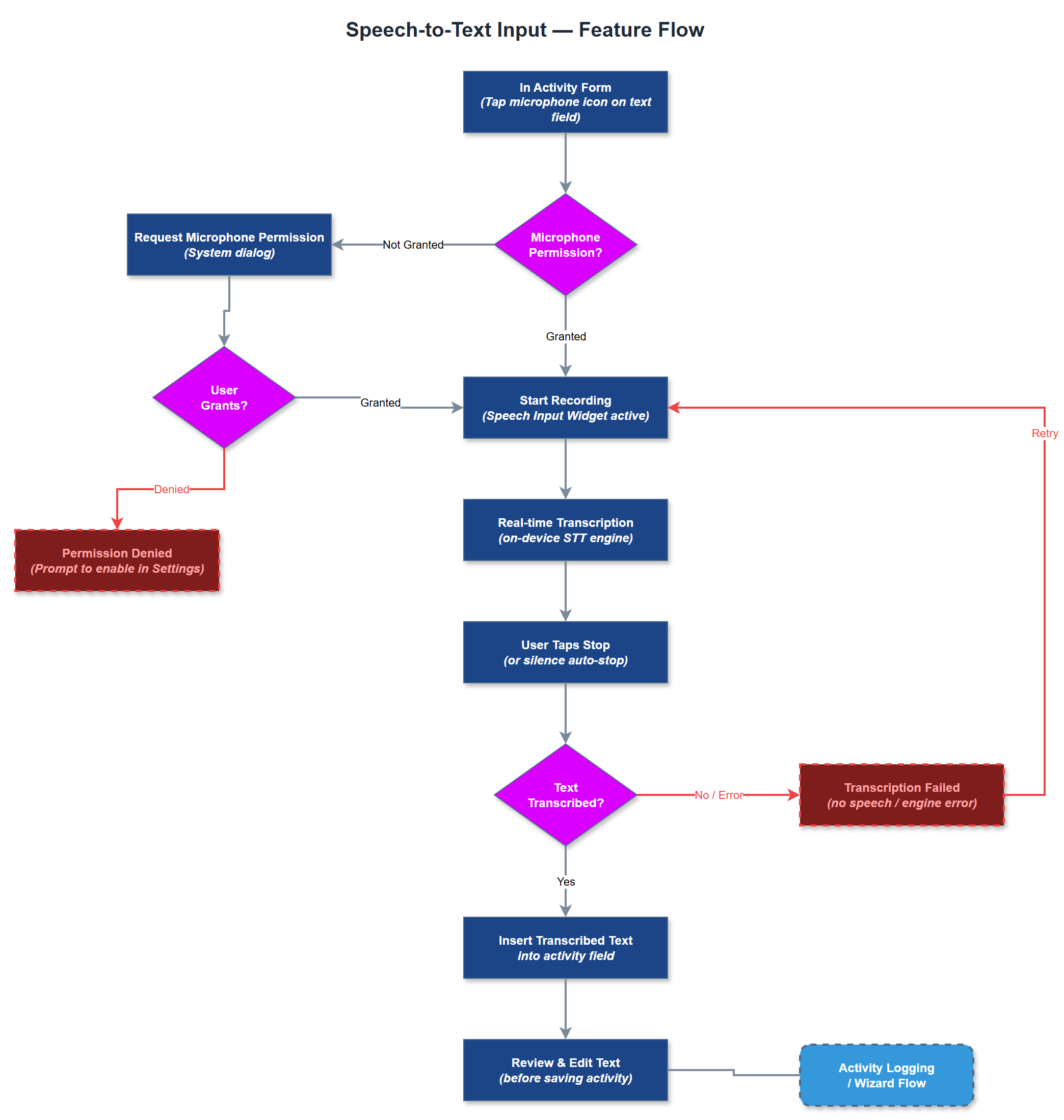
Analysis
Blindeforbundet and HLF both identified speech-to-text as a significant accessibility and efficiency improvement. For users with visual impairments or motor difficulties, typing on a mobile keyboard is slow and error-prone; dictation dramatically reduces the effort of completing a registration. For all users, the ability to narrate a summary immediately after a home visit - while the details are fresh - improves the quality and completeness of records. Blindeforbundet explicitly noted that recording during visits is unwanted and would inhibit open conversation, so the post-activity-only design constraint is a trust and safety requirement, not merely a technical choice.
The Speech Input Widget integrates with Flutter's speech_to_text plugin, which wraps the native iOS Speech framework and Android SpeechRecognizer. Microphone permission is requested lazily on first use with a clear purpose string. Transcription runs on-device where supported; no audio is sent to external servers. The Speech-to-Text Service manages the recognition session lifecycle (start, interim results, final result, error) and emits BLoC events consumed by the active form widget. The microphone button meets WCAG 2.2 AA touch target requirements and has an accessible label. An active recording indicator (visual + haptic) is displayed during dictation. If the device language is set to a supported Sami language, the service falls back to Norwegian recognition with a user-visible notice.
Components (34)
Shared Components
These components are reused across multiple features
Service Layer (9)
Data Layer (12)
Infrastructure (7)
User Stories
No user stories have been generated for this feature yet.