Simple Activity Logging
Feature Detail
Description
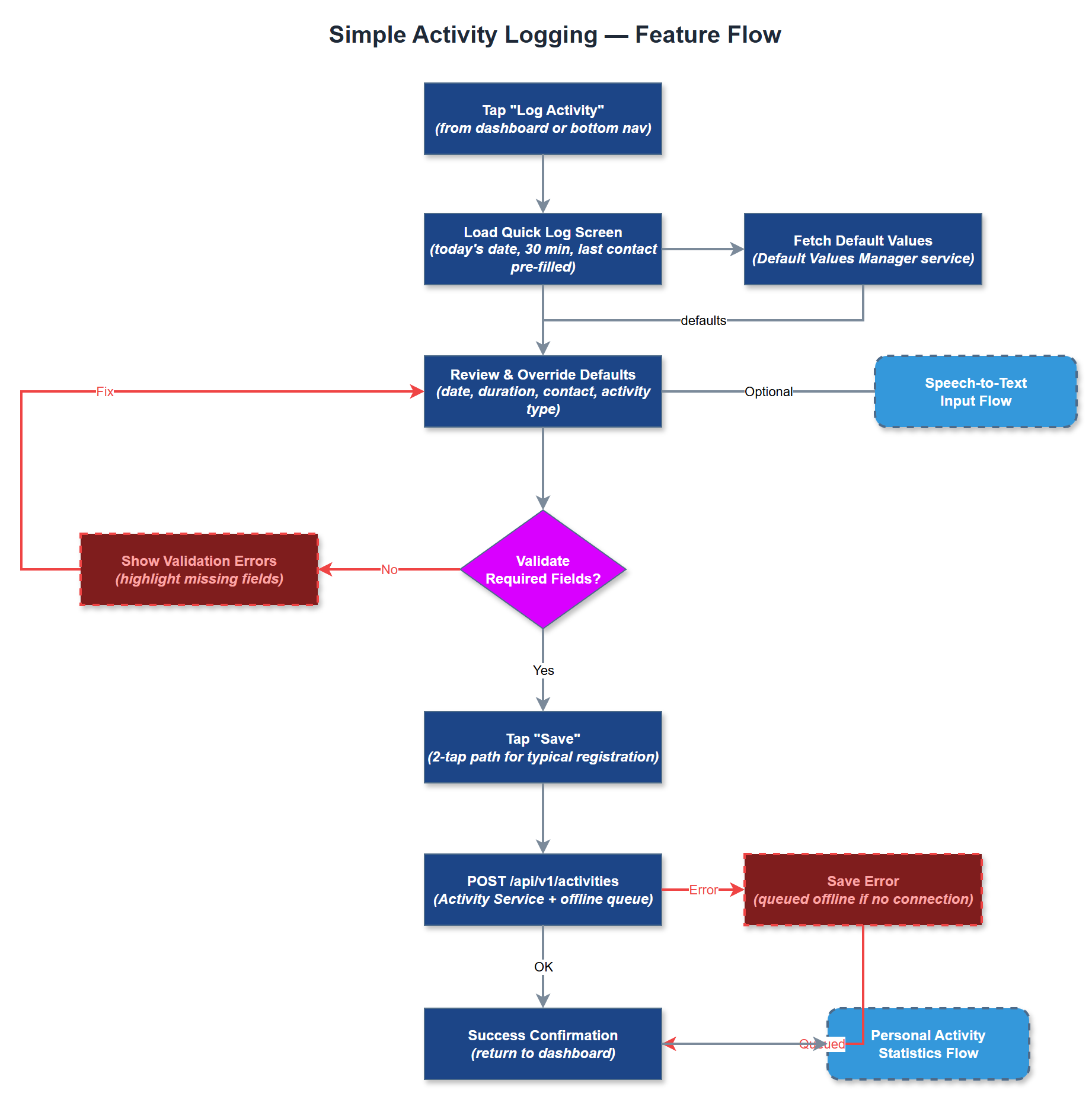
Simple Activity Logging provides peer mentors and coordinators with the fastest possible way to record a completed interaction with a contact. The feature is designed around the principle of minimal cognitive load - pre-filled defaults (today's date, 30-minute duration, most recent contact) mean a typical registration takes two taps. Users can override any default before saving. The feature supports the 60-70% of registrations that require no reimbursement, making those frictionless while still accommodating richer input when needed.
User Flow
Analysis
Underreporting of peer mentor activity is the single largest data quality problem across all partner organisations. NHF uses manual Word-to-Excel flows; HLF documented one peer mentor with 380 registrations in a year - a volume that is only sustainable with near-zero friction. Solving this directly increases the accuracy of Bufdir reporting, strengthens funding applications, and makes the invisible labour of peer mentors visible. For Norse Digital Products, this feature is the primary value proposition that drives adoption and retention across all customer organisations, making it the commercial cornerstone of the platform.
Implemented in Flutter using BLoC for state management. The Quick Log Screen presents a single-screen form with smart defaults sourced from the user's activity history via the Activity Service and Activity Repository. Default values are stored and updated per user in the local SQLite cache for offline support. The Default Values Manager service encapsulates the logic for computing and persisting defaults. Form submission posts to the REST API; on success the local cache is invalidated. WCAG 2.2 AA compliance requires all form fields to meet minimum touch target sizes (24×24px), adequate contrast, and VoiceOver/TalkBack labels on every interactive element.
Components (36)
Shared Components
These components are reused across multiple features
Service Layer (9)
Data Layer (12)
Infrastructure (7)
User Stories
No user stories have been generated for this feature yet.