Sensitive Field Readout Warning
Feature Detail
Description
This feature displays a visible warning to the user when a screen reader is about to read aloud a field containing sensitive personal information, such as names, addresses, diagnoses, or contact details belonging to vulnerable individuals. The warning gives the user an opportunity to pause or mute the readout before the sensitive content is spoken aloud in a shared or public environment. This is particularly critical for the encrypted assignments feature used by Blindeforbundet, where peer mentors may receive sensitive epikrise and personal data on their devices.
User Flow
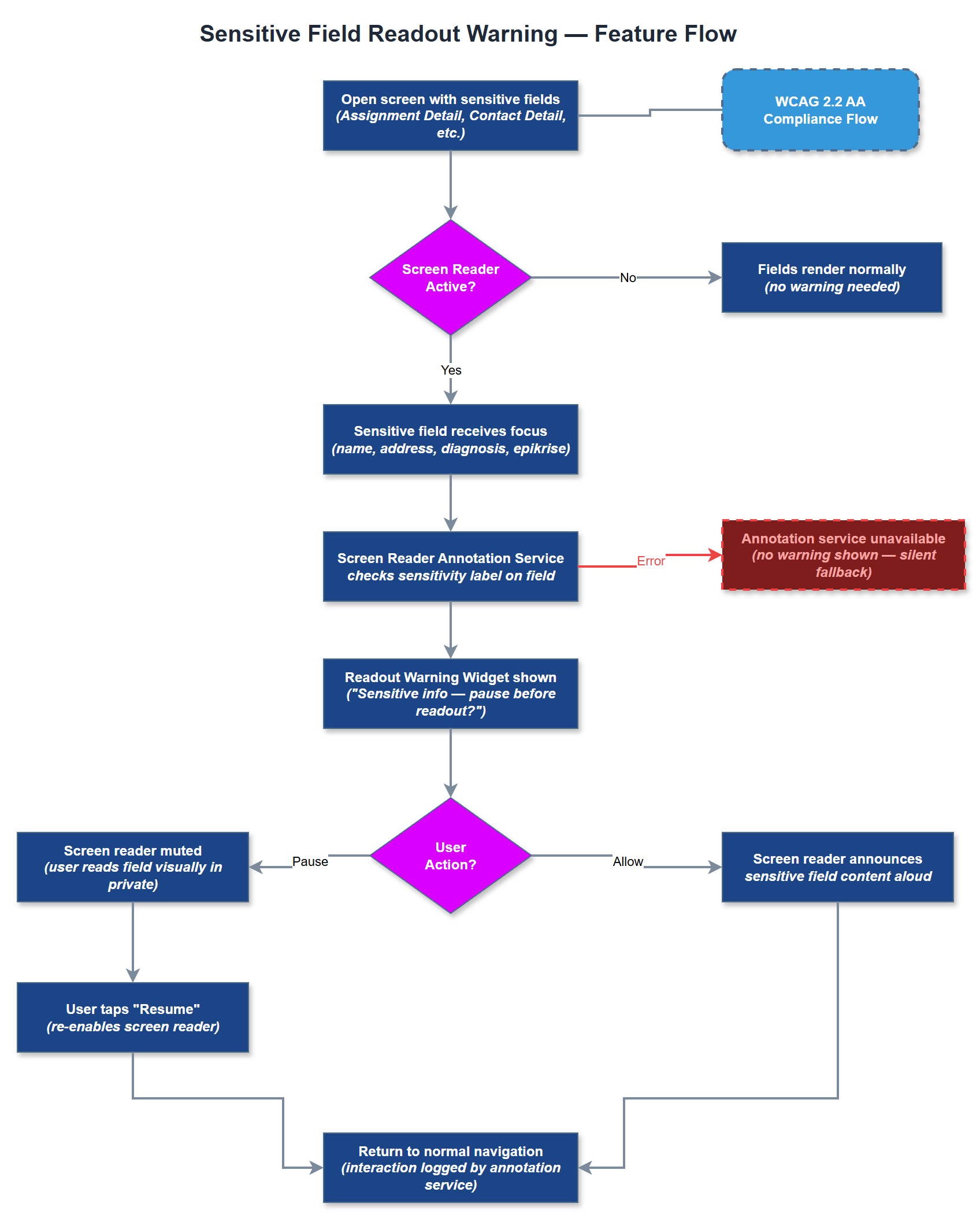
Analysis
Peer mentors often use the app in public settings - on public transport, in waiting rooms, or at shared workspaces - where having sensitive contact or assignment data read aloud by a screen reader creates a serious privacy risk for the individuals receiving support. NHF explicitly identified this as a required safeguard for their user base. Failure to implement this feature could expose the platform to GDPR violations related to inadvertent disclosure of sensitive personal data, creating significant legal and reputational risk for both Norse Digital Products and their client organizations. It also demonstrates a sophisticated understanding of real-world accessibility use cases, strengthening trust with prospective customers.
Implement a SensitiveFieldWrapper Flutter widget that wraps any field marked as sensitive. When a screen reader is active (detected via AccessibilityFeatures.accessibleNavigation in Flutter's MediaQuery), the widget intercepts the focus event and first presents a warning dialog or banner before allowing the screen reader to announce the content. Use Flutter's SemanticsService and Semantics node ordering to ensure the warning is announced before the sensitive value. Define a canonical list of sensitive field types in constants (name, address, diagnosis, assignment content, caregiver details) and apply the wrapper consistently across all relevant screens. The warning UI must itself be fully accessible and dismissible via screen reader gestures.
Components (36)
Shared Components
These components are reused across multiple features
Service Layer (9)
Data Layer (12)
Infrastructure (7)
User Stories
No user stories have been generated for this feature yet.