Role-Specific Home Dashboard
Feature Detail
Description
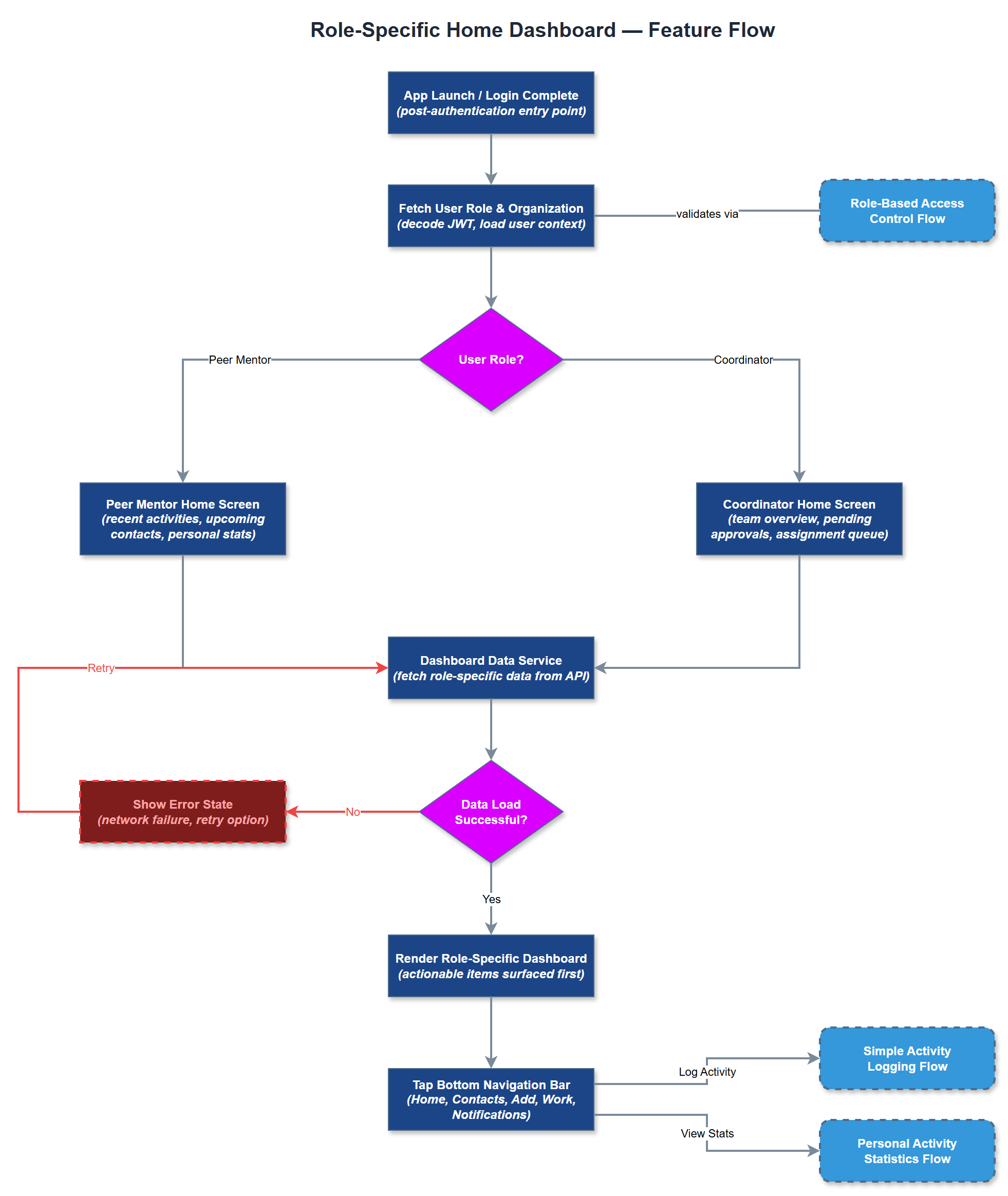
The Role-Specific Home Dashboard provides a tailored landing experience immediately after login, presenting contextually relevant information based on whether the user is a Peer Mentor or a Coordinator. Peer Mentors see their recent activities, upcoming contacts, and personal stats, while Coordinators see team overviews, pending approvals, and assignment queues. This differentiation ensures users are never overwhelmed with irrelevant information and can act immediately without navigating away from the home screen. The dashboard integrates with the bottom navigation bar and serves as the central hub for daily workflows, surfacing the most actionable items first. It is designed to minimize cognitive load for users with varying digital skill levels, including those with cognitive disabilities.
User Flow
Analysis
A role-specific home screen is essential for user adoption among peer mentors who are often volunteers with limited technical experience. Presenting the right information immediately reduces friction and increases daily active usage, which directly translates to more complete activity reporting - the primary metric for Bufdir compliance. For Coordinators, the dashboard consolidates oversight tasks that would otherwise require navigating multiple screens, reducing time-to-action on approvals and assignments. This feature also reinforces trust in the platform by demonstrating that the app understands each user's role, which is critical for onboarding success across NHF, Blindeforbundet, and HLF. Higher engagement from day one reduces churn and support burden during the pilot phase.
Implement using Flutter with BLoC for state management, where the home screen widget tree is determined at build time based on the authenticated user's role fetched from the JWT claims. Avoid runtime role-switching complexity by rendering two separate screen subtrees (PeerMentorHomeScreen, CoordinatorHomeScreen) with a shared bottom navigation shell. Dashboard data is fetched via REST API calls to `/api/v1/dashboard` with role-scoped query parameters, with response caching using Riverpod providers to avoid redundant network calls on tab switching. The bottom navigation bar is a shared widget with five tabs (Home, Contacts, Add, Work, Notifications) rendered consistently across roles. All dashboard cards must meet WCAG 2.2 AA contrast and touch target requirements (minimum 24x24 CSS pixels). Skeleton loaders should be used during data fetch to prevent layout shift.
Components (39)
Shared Components
These components are reused across multiple features
Service Layer (9)
Data Layer (12)
Infrastructure (7)
User Stories
No user stories have been generated for this feature yet.