Role Assignment
Feature Detail
Description
Role Assignment enables organization administrators to assign, change, and remove roles for users within their organization. A user may hold one of the defined roles - Peer Mentor or Coordinator - within a specific local association context. The feature provides a dedicated role assignment widget embedded in the user detail page and as a standalone workflow accessible from bulk actions. Role changes take effect immediately, updating the user's access rights across both the mobile app and admin portal without requiring re-login. The feature must enforce organizational boundaries: an org admin can only assign roles within their own organization and its associated local associations. Role history is preserved in the audit log for compliance purposes. The UI clearly communicates what permissions each role grants, reducing misconfiguration by administrators unfamiliar with the access model.
User Flow
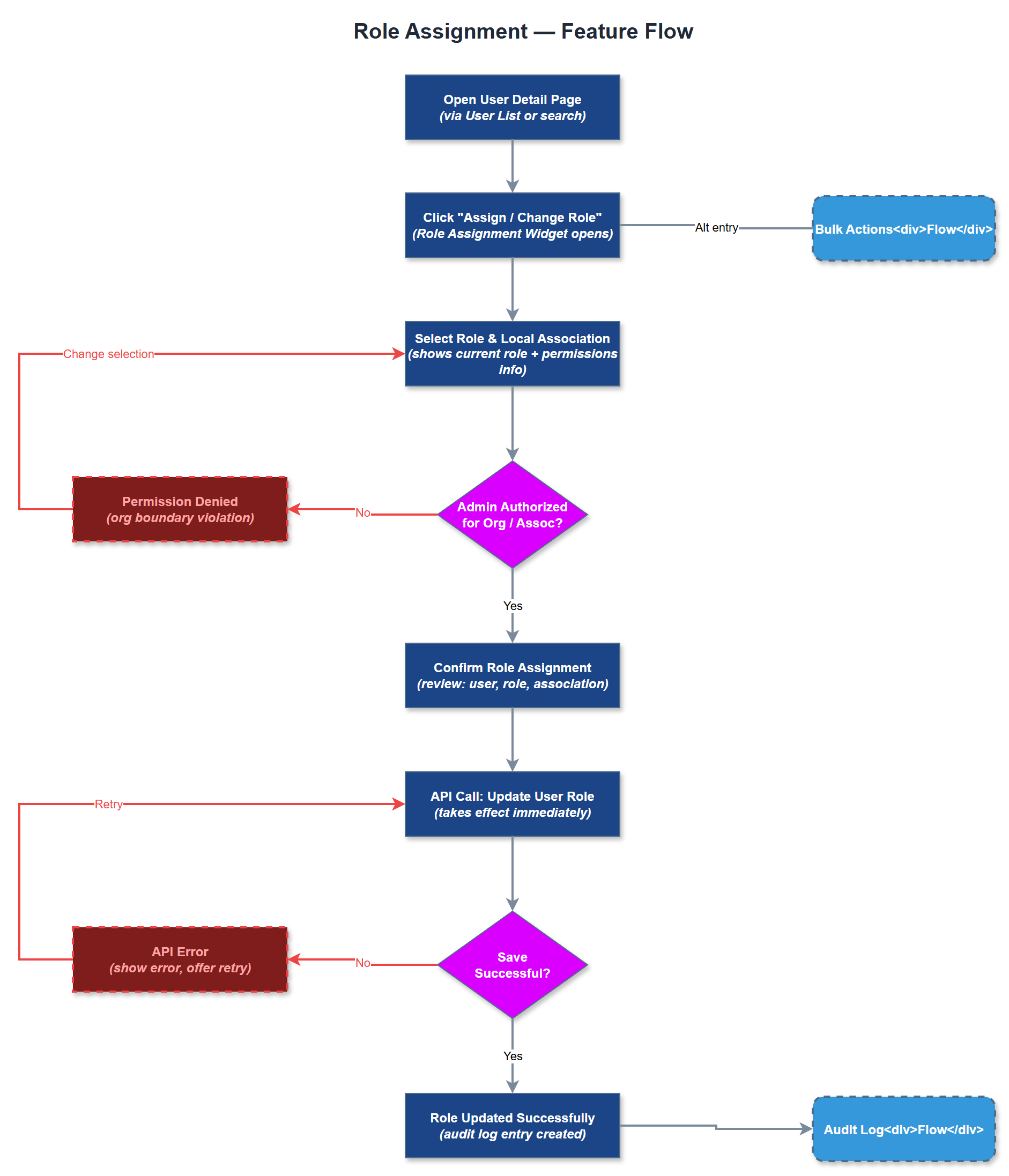
Analysis
Correct role assignment is the mechanism by which the platform enforces its access model - a peer mentor who is incorrectly assigned coordinator rights can view and act on data they should not access, creating both a privacy risk and a compliance issue under GDPR. Conversely, a coordinator missing their role cannot approve expenses or dispatch assignments, directly blocking operational workflows. Providing a clear, audited role assignment interface eliminates the ambiguity and error risk of managing this outside the system. For organizations with high volunteer turnover, the ability to quickly reassign roles without IT involvement reduces the administrative lag between a person changing responsibilities and their system access reflecting that change. This directly improves operational continuity and reduces the window during which stale access permissions exist.
Role assignments are stored in the `user_roles` junction table with `user_id`, `organization_id`, `role_id`, and `local_association_id`. A user may have at most one active role per organization. The assignment API endpoint (`PUT /api/v1/users/:id/role`) validates that the requesting admin's organization matches the target user's organization before applying the change. Role resolution is performed at JWT issuance time - changing a role does not immediately invalidate the existing JWT, but the mobile app re-fetches the user profile on next foreground activation, and the admin portal uses server-side session validation on every request, so the effective propagation delay is under 60 seconds. The role assignment widget uses a controlled select component with explicit confirmation step before submission to prevent accidental changes. Role descriptions are fetched from a static configuration and displayed inline. All role changes are written to the `audit_logs` table with the acting admin's ID, timestamp, previous role, and new role for full traceability.
Components (35)
Shared Components
These components are reused across multiple features
Service Layer (9)
Data Layer (12)
Infrastructure (7)
User Stories
No user stories have been generated for this feature yet.