Profile Data & Settings
Feature Detail
Description
This feature enables peer mentors and coordinators to view and edit their personal profile information within the Meander Mobile App. Users can update contact details, preferences, and account settings relevant to their role and organization. The profile serves as the central identity record for the user within their organization context, displaying role assignments, associated local association, and configurable display preferences. Organization-specific terminology is reflected throughout the profile based on the org's custom labels configuration.
User Flow
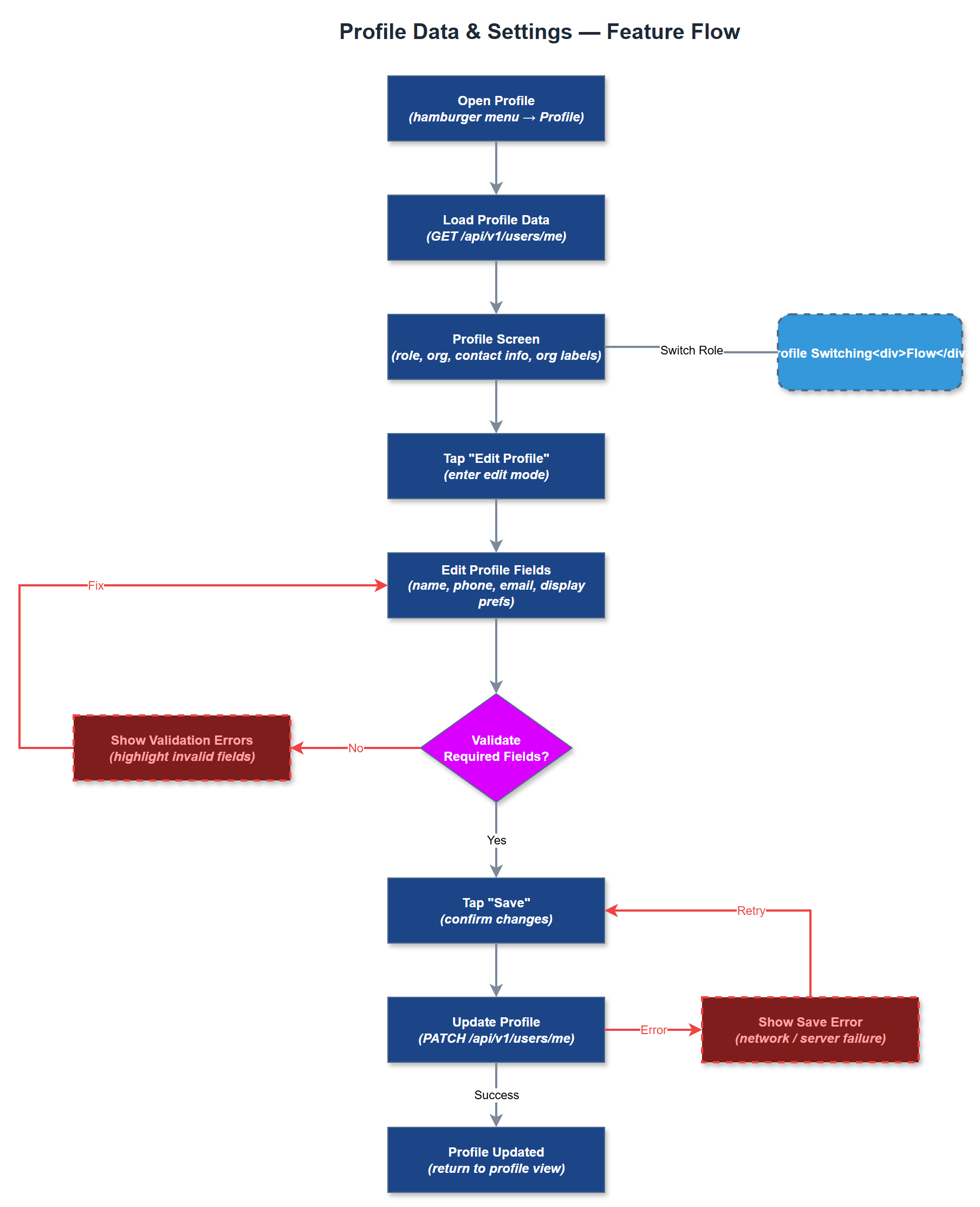
Analysis
A well-functioning profile management system is foundational to user trust and adoption. Peer mentors and coordinators need accurate, up-to-date profile information to ensure correct attribution of activities, proper expense reimbursement routing, and correct reporting to Bufdir. For organizations managing hundreds of volunteers, accurate profile data reduces administrative overhead for coordinators and org admins. From a platform perspective, profile data underpins multi-tenancy correctness - ensuring each user is associated with the right organization, role, and local association. This directly reduces support burden and data quality issues that would otherwise require manual correction by admins.
Profile data is fetched via REST API and stored with organization context (tenant-scoped). The Flutter UI uses BLoC for state management, with form validation covering required fields and WCAG 2.2 AA compliant input widgets. The User Repository handles reads and writes against the users and user_roles tables. Organization-specific terminology (e.g., custom labels for "Peer Mentor") is injected at render time via the org labels system. Avatar/photo upload should use the same file upload infrastructure as receipt photo upload. All form fields must meet minimum touch target sizes and contrast ratios per WCAG 2.2 AA. Sensitive fields (e.g., personal ID) must trigger the readout warning widget when screen reader is active.
Components (37)
Shared Components
These components are reused across multiple features
Service Layer (9)
Data Layer (12)
Infrastructure (7)
User Stories
No user stories have been generated for this feature yet.