Notes List
Feature Detail
Description
The Notes List feature provides peer mentors and coordinators with a centralized view of all notes associated with their contacts and activities. Users can browse, search, and filter notes to quickly locate relevant entries without navigating through individual contact profiles. The list view supports sorting by date and contact, giving users immediate context for follow-up actions. This feature serves as the entry point to the notes subsystem, enabling efficient information retrieval across potentially large collections of recorded observations and follow-up items.
User Flow
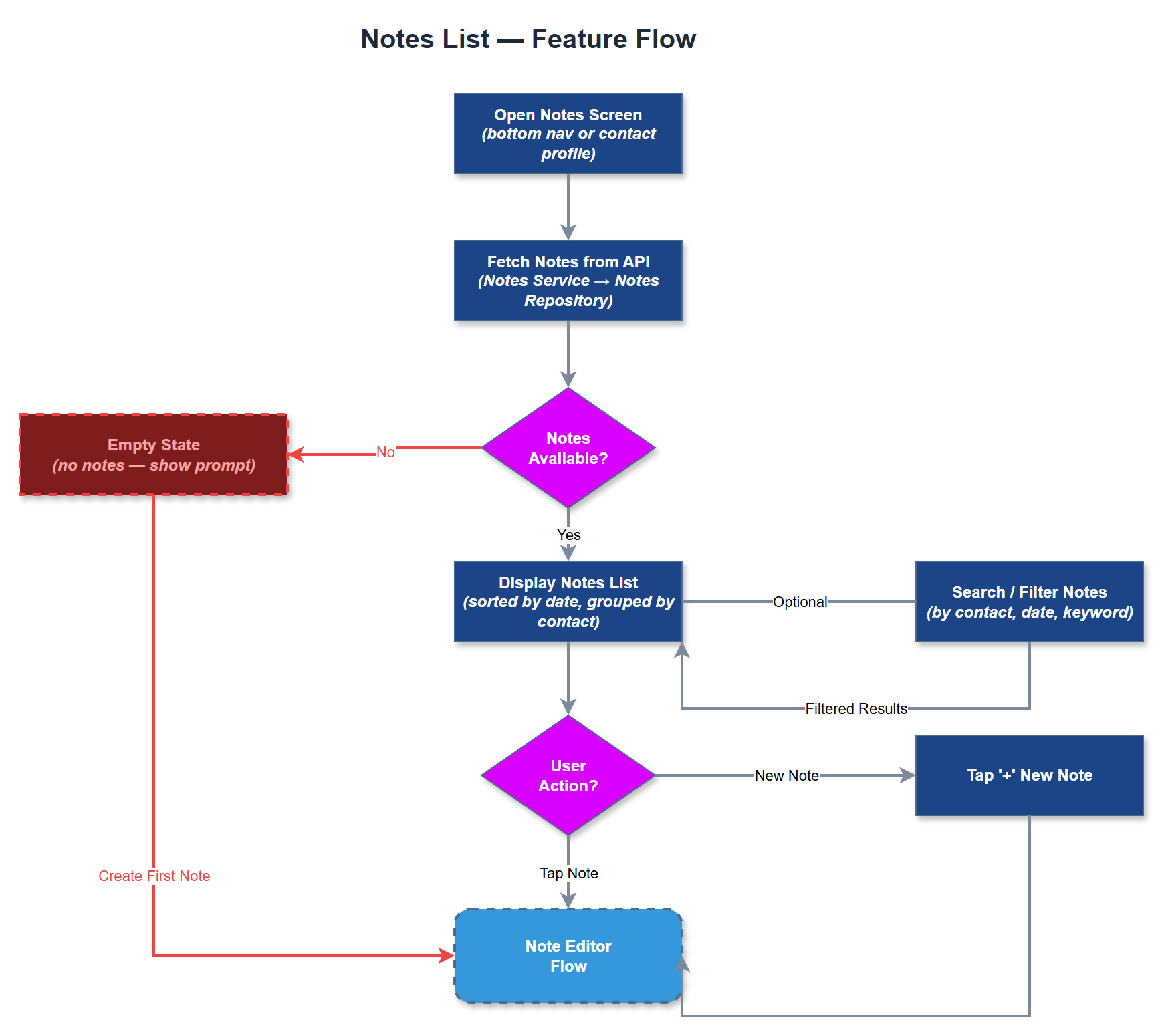
Analysis
Notes are a critical tool for peer mentors to maintain continuity of care across multiple interactions with contacts. Without a consolidated list view, mentors must navigate individual contact profiles to find relevant notes, leading to lost context and reduced quality of support. A searchable notes list reduces administrative overhead and ensures important observations are surfaced at the right time. For coordinators, the notes list provides visibility into what their peer mentors have documented, supporting oversight and quality assurance without requiring direct contact. This directly supports the platform's core mission of structured, accountable peer support delivery across all participating organisations.
The notes list is implemented as a Flutter screen backed by a BLoC or Riverpod state management layer that fetches paginated notes from the REST API. The backend exposes a filtered notes endpoint scoped to the authenticated user's accessible contacts and organisations, enforcing multi-tenancy at the query level using PostgreSQL row-level security or application-level filtering. The UI must meet WCAG 2.2 AA requirements, including sufficient contrast ratios, minimum touch target sizes, and semantic labels for screen readers. Search is implemented client-side for small datasets or via debounced API queries for larger ones. The list integrates with the note-editor feature for navigation to detail and edit views.
Components (37)
Shared Components
These components are reused across multiple features
Service Layer (9)
Data Layer (12)
Infrastructure (7)
User Stories
No user stories have been generated for this feature yet.