Note Editor
Feature Detail
Description
The Note Editor feature allows peer mentors and coordinators to create, view, and edit free-text notes linked to specific contacts or activities. The editor supports multi-line text input with autosave functionality to prevent data loss during interruptions. Notes can be associated with a contact record and optionally tied to a specific activity, providing structured context for future reference. The editor is designed for quick capture during or immediately after an interaction, with a minimal interface that prioritises keyboard accessibility and screen reader compatibility for users with visual or motor impairments.
User Flow
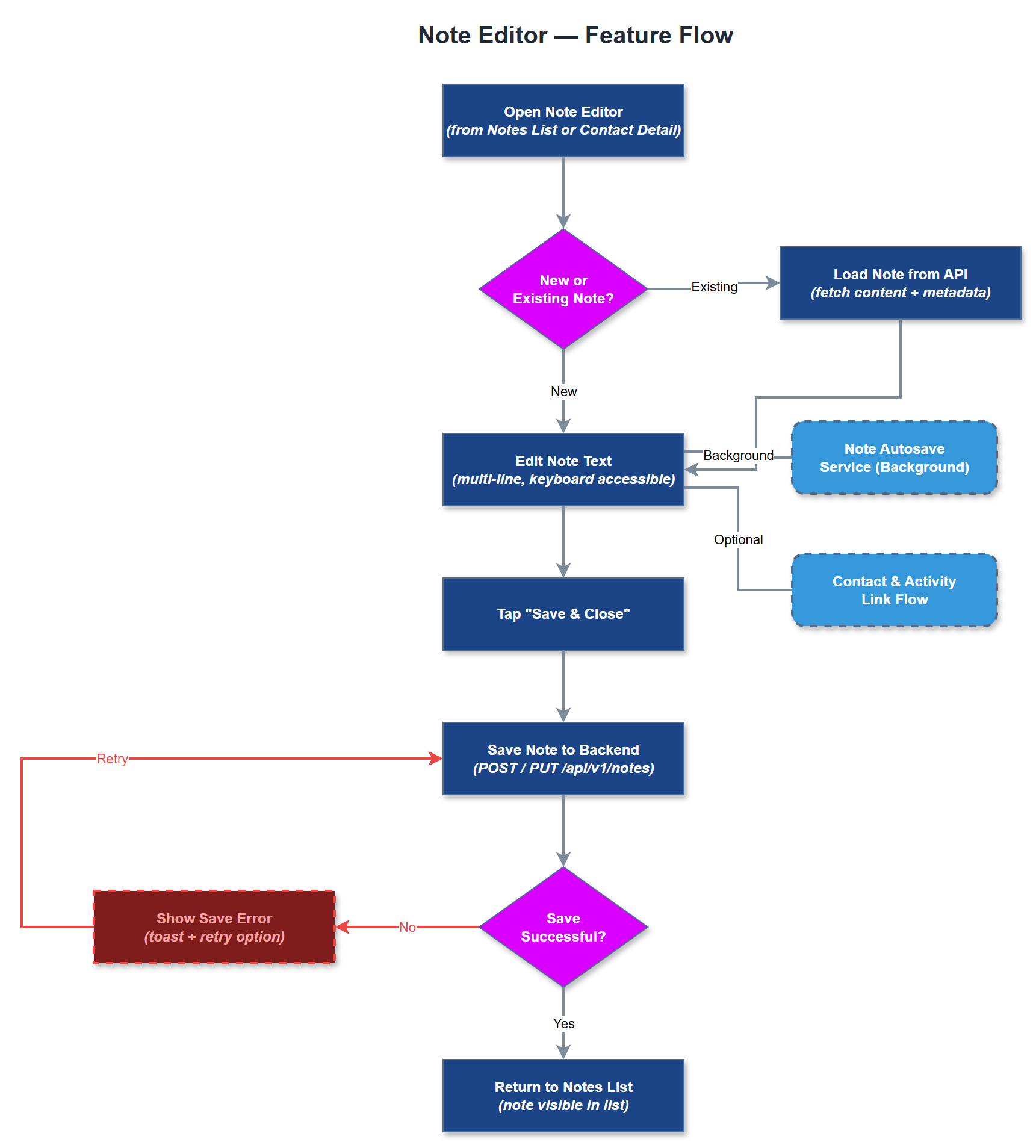
Analysis
Structured note-taking directly supports the quality and continuity of peer mentorship. When mentors can capture observations immediately after an interaction, critical details are preserved that would otherwise be lost to memory. This is especially important in multi-mentor or coordinator-supervised settings where handoffs occur. Autosave functionality is particularly valuable given that the app is used in mobile contexts where interruptions are common - preventing note loss reduces frustration and increases adoption. For organisations like Blindeforbundet that require formalisert rapportstruktur after home visits, the note editor provides the foundational tool on which structured reporting can be built in future phases. Accurate, timestamped notes also support Bufdir reporting by providing an auditable record of peer mentor activity.
The note editor is a Flutter screen using a standard TextField or rich text input widget, managed by a BLoC or Riverpod notifier that triggers autosave via debounced write operations to the REST API. Autosave should persist drafts locally using SQLite (shared with the offline-sync subsystem) before syncing to the backend, ensuring no data loss when connectivity is interrupted. The backend notes endpoint accepts create and update operations with contact_id and optional activity_id foreign keys. The UI must comply with WCAG 2.2 AA: the text field must support dynamic type scaling up to 200%, maintain 4.5:1 contrast, and expose proper accessibility labels. Integration with the speech-to-text-input feature should be planned for a later phase. The editor must handle concurrent edits gracefully if the same note is opened on multiple sessions.
Components (34)
Shared Components
These components are reused across multiple features
Service Layer (9)
Data Layer (12)
Infrastructure (7)
User Stories
No user stories have been generated for this feature yet.