Feature Toggles
Feature Detail
Description
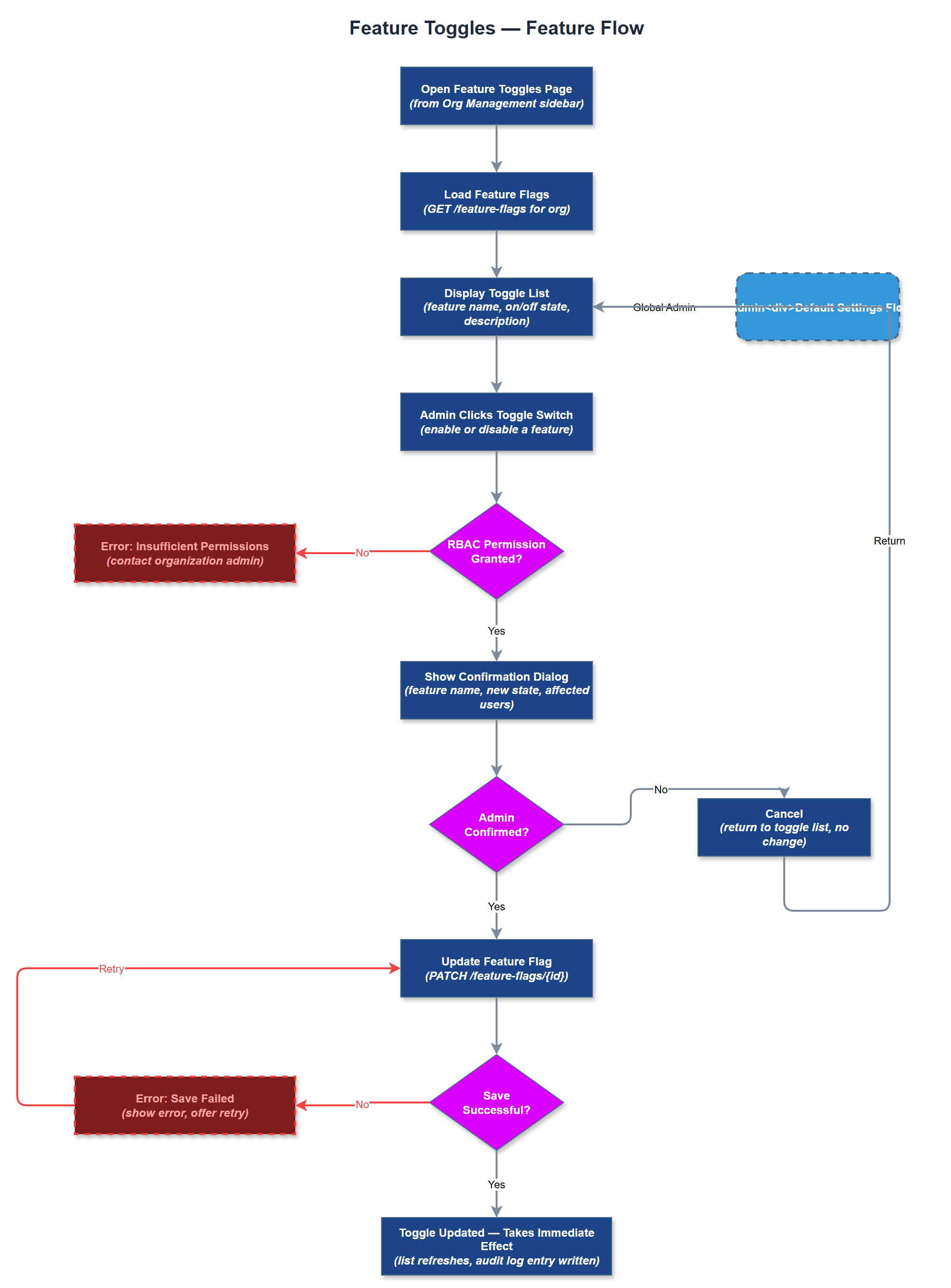
Feature Toggles give organization administrators the ability to enable or disable specific platform capabilities for their organization. This supports phased rollouts, pilot programs, and per-organization customization of the feature set. For example, an organization not using the expense reimbursement module can hide it entirely from their peer mentors' mobile app. Toggles are managed via a dedicated admin page and take effect immediately without requiring a new app deployment. Global admins can also set default toggle states for all organizations.
User Flow
Analysis
Not all organizations have the same feature needs, and exposing irrelevant functionality creates confusion for end users with limited digital literacy. Feature toggles enable Norse Digital Products to ship one unified platform while allowing each customer to present a focused, relevant experience to their users. This reduces support burden (users don't call about features they don't use) and accelerates MVP adoption by letting organizations start with a minimal surface area and expand over time. Toggles also serve as a commercial lever - premium features can be gated behind paid tiers, enabling tiered pricing without maintaining separate codebases.
Feature flags are stored in the `feature_flags` table with an organization foreign key, a feature key string, and a boolean enabled value. The Feature Flag Service exposes a `/api/v1/organizations/:id/feature-flags` endpoint. The Flutter app fetches the flag map at login and caches it; all conditional UI rendering checks the local cache. The admin portal reads flags server-side and conditionally renders navigation items and pages. The Feature Toggle Page in the admin portal presents a list of all toggleable features with descriptions and on/off switches. Flag key names are defined in a shared constants file to prevent drift between frontend and backend. Global admin can set org-level defaults via a separate system admin view.
Components (36)
Shared Components
These components are reused across multiple features
Service Layer (9)
Data Layer (12)
Infrastructure (7)
User Stories
No user stories have been generated for this feature yet.