External Resource Links
Feature Detail
Description
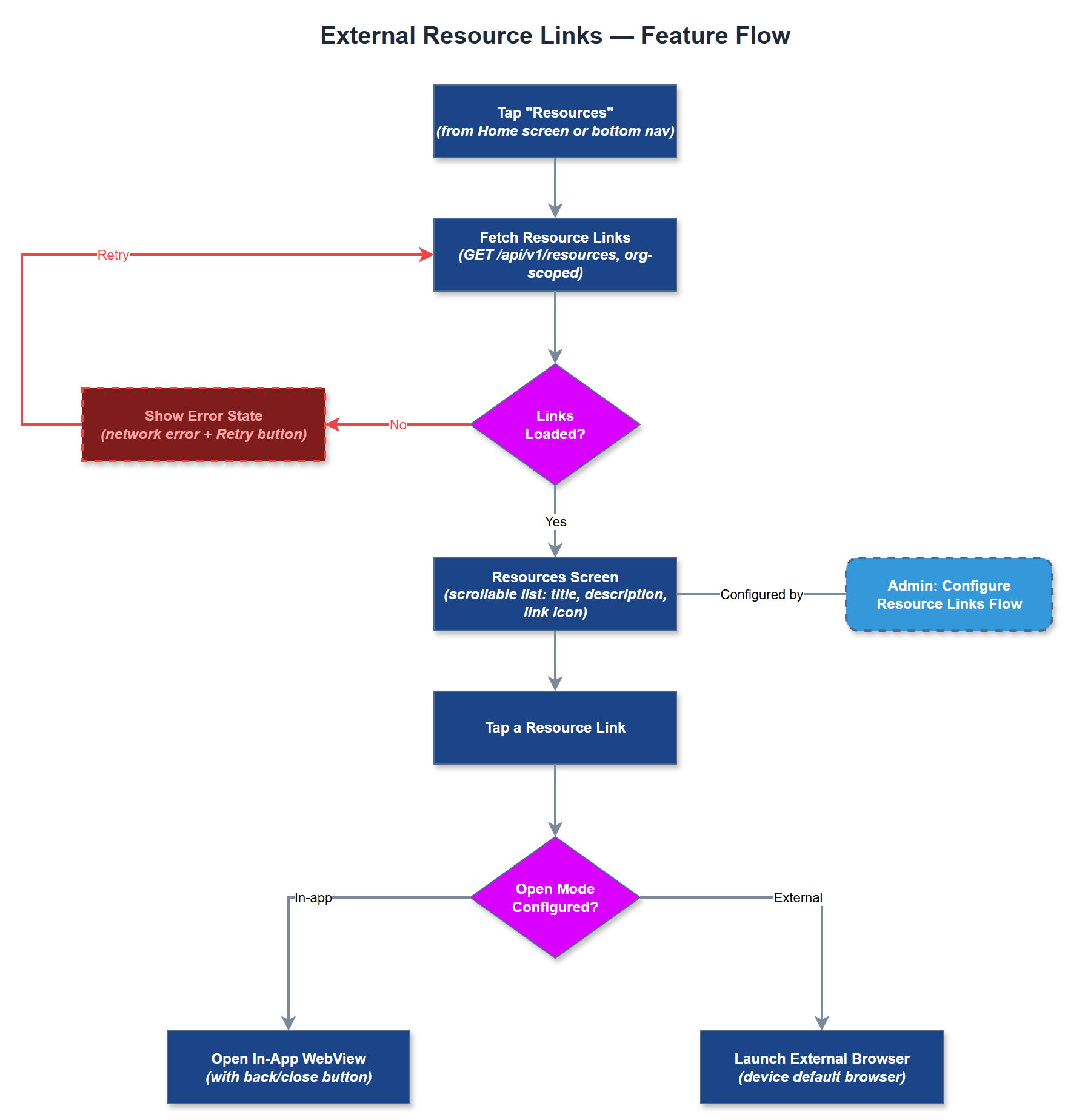
External Resource Links provides a curated, organization-configurable screen of links to external resources relevant to peer mentors and coordinators, such as training materials, Bufdir guidelines, organizational handbooks, and partner websites. The list of links is fetched from the backend and can be configured per organization by administrators, ensuring that each organization's users see resources relevant to their context. Links open in the device's default browser or an in-app web view depending on configuration. The screen is intentionally simple - a scannable list with titles, optional descriptions, and external link indicators - designed to serve as a lightweight resource hub without requiring full content management capabilities in the MVP.
User Flow
Analysis
Peer mentors frequently need access to reference materials during or after interactions with contacts, such as Bufdir reporting templates, organizational guidelines, or training syllabi. Without an in-app resource hub, users must maintain bookmarks in their browser or rely on email threads - fragmented and unreliable channels. Centralizing links in the app increases the likelihood that peer mentors consult correct and up-to-date materials, improving report quality and compliance. For organizations, the ability to push relevant resources through the admin portal gives them a lightweight communication channel to mentors without requiring a separate content management system. This feature also supports the onboarding of new peer mentors by surfacing introductory materials prominently.
Implement as a stateless Flutter screen that fetches the resource link list from `/api/v1/resources` with organization context derived from the authenticated user's JWT. Cache the response with a short TTL (e.g., 15 minutes) using Riverpod to avoid repeated network calls during a session. Each link item renders as a tappable list tile with title, optional subtitle, and an external link icon. Use `url_launcher` package to open URLs in the system browser; avoid in-app web views for MVP to reduce complexity and security review surface. The admin portal manages resource links via a simple CRUD interface backed by a `resource_links` table scoped to organization ID. Ensure external link indicators are present for screen reader users (announce "opens in browser"). No authentication is passed to external URLs.
Components (35)
Shared Components
These components are reused across multiple features
Service Layer (9)
Data Layer (12)
Infrastructure (7)
User Stories
No user stories have been generated for this feature yet.