Expense Approval Queue
Feature Detail
Description
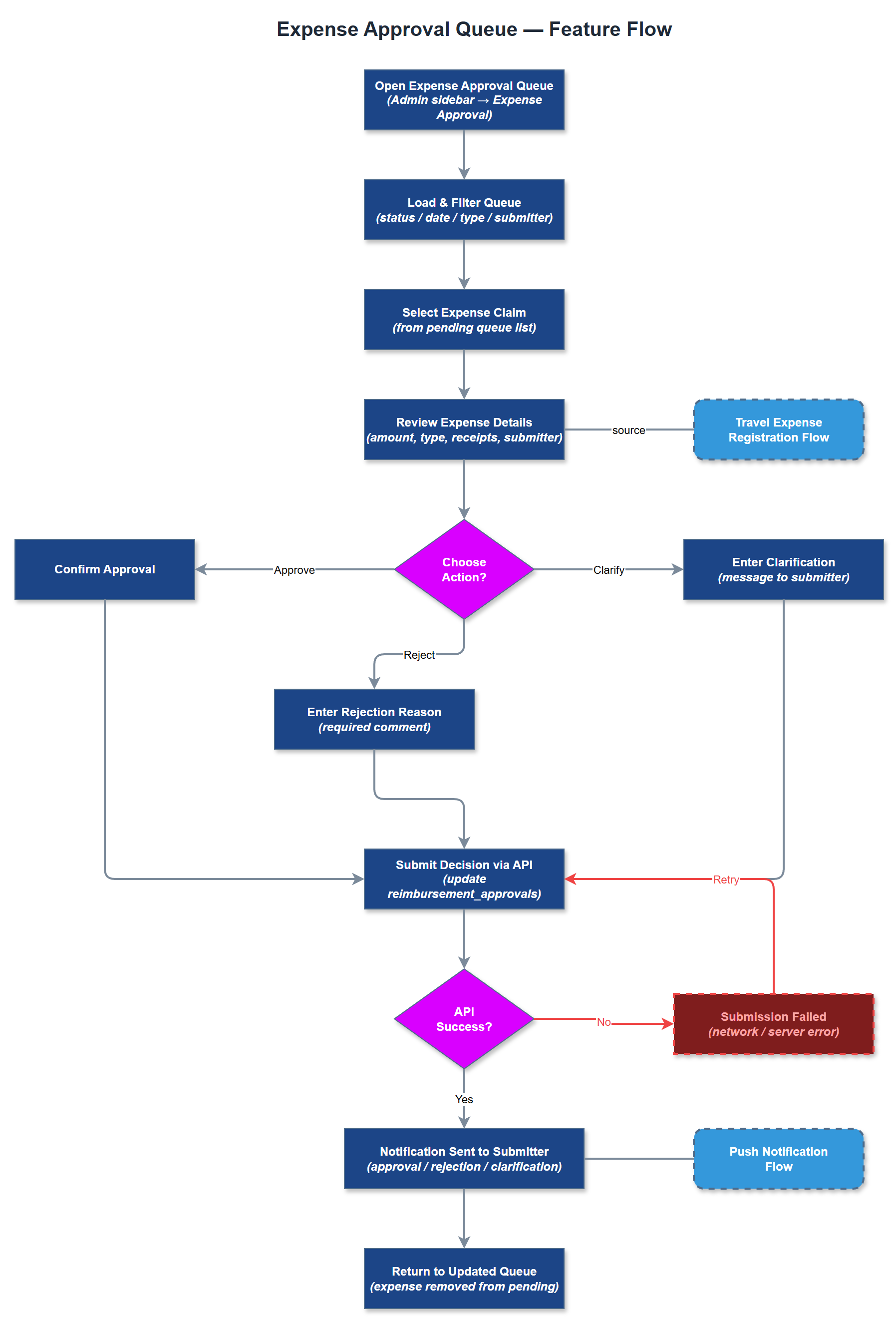
The Expense Approval Queue provides coordinators and organization administrators with a centralized interface for reviewing and acting on submitted expense claims from peer mentors. The queue displays all pending reimbursement requests with relevant metadata - submitter, amount, expense type, date, and attached receipts - enabling efficient triage and decision-making. Approvers can approve, reject, or request clarification on individual claims, with each action triggering appropriate notifications to the submitter. The queue supports filtering by status, date range, expense type, and submitter to help coordinators manage high volumes efficiently.
User Flow
Analysis
Manual expense approval processes are a significant administrative burden for coordinators and org admins, often involving email chains, spreadsheets, and duplicate data entry. A structured approval queue eliminates this overhead by centralizing all pending claims in a single interface with full context - receipt images, expense type, amount, and submitter history - enabling faster and more accurate decisions. This directly reduces reimbursement turnaround times, improving volunteer satisfaction and retention. For organizations receiving Bufdir funding, a traceable and auditable approval workflow also strengthens compliance posture and simplifies financial reporting, reducing the risk of funding disputes or audit findings.
The approval queue is implemented as a server-side rendered Next.js page in the admin portal, fetching paginated expense records from the REST API with status filtering. The backend exposes PATCH endpoints for approval/rejection actions, updating the reimbursement_approvals table with actor ID, timestamp, and optional rejection reason. Receipt images are stored in object storage and served via signed URLs with short TTLs. Real-time queue updates use polling or WebSocket-based push from the Next.js backend. Role-based access ensures only coordinators (for their local association) and org admins (for their organization) can see and act on claims. All approval actions are written to the audit_logs table for full traceability.
Components (35)
Shared Components
These components are reused across multiple features
Service Layer (9)
Data Layer (12)
Infrastructure (7)
User Stories
No user stories have been generated for this feature yet.