Digital Peer Mentor Certificate
Feature Detail
Description
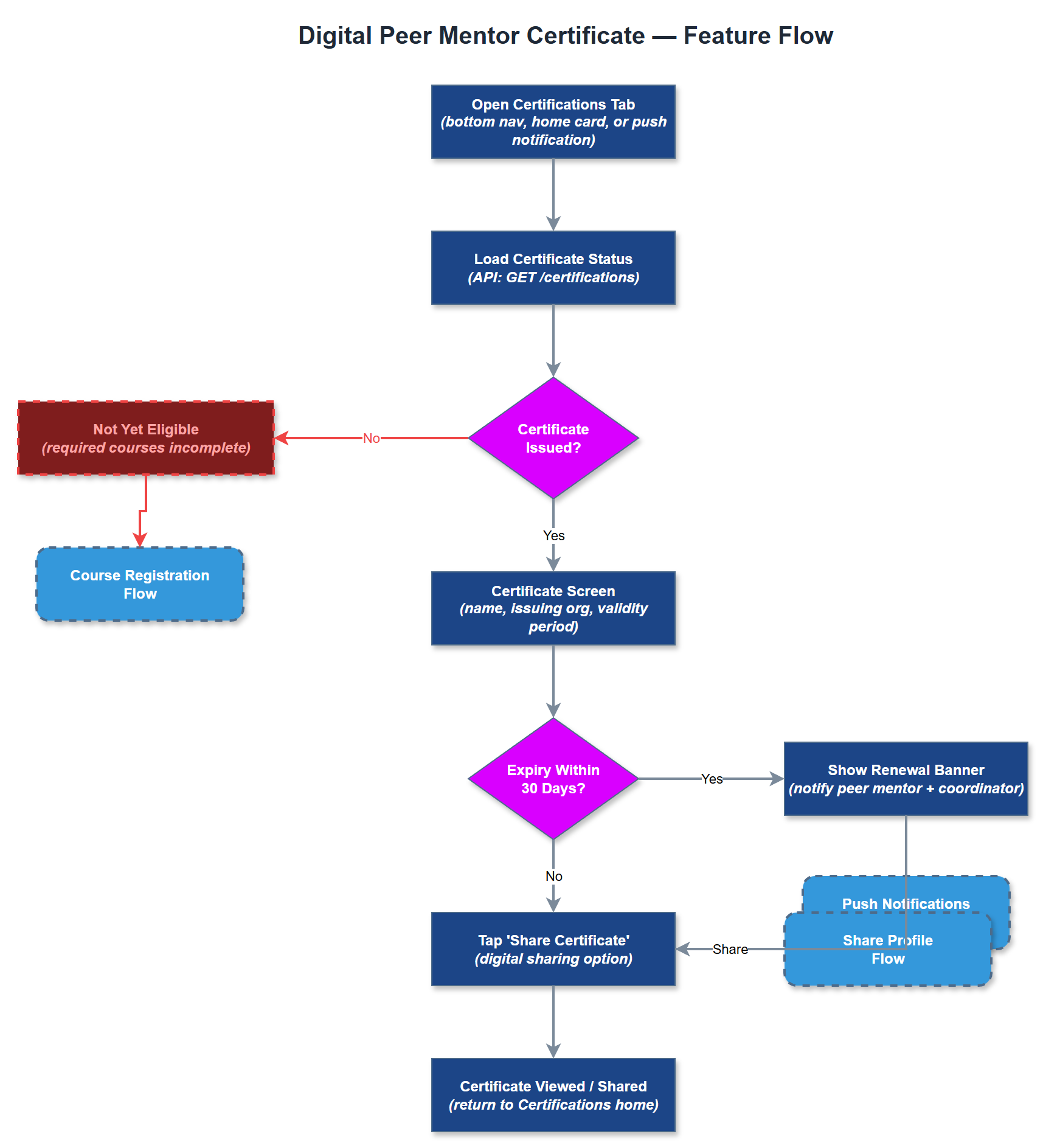
Digital Peer Mentor Certificate provides verified, in-app certification for peer mentors who have completed the required training. The certificate is displayed on a dedicated screen with the peer mentor's name, issuing organization, and validity period, and can be shared digitally. The feature supports automatic expiry tracking and notifies both the peer mentor and their coordinator when renewal is approaching. A physical card equivalent is preserved as a parallel option per HLF's requirement that the physical card retain its status as a tangible credential.
User Flow
Analysis
Certification is the formal gate that determines whether a peer mentor can be listed publicly and dispatched on assignments. Digitizing this credential removes the administrative lag between course completion and active status, allowing organizations to onboard newly qualified peer mentors faster. For HLF, the existing rule that an expired certificate removes the peer mentor from the organization's public website makes automated expiry tracking a hard operational requirement rather than a convenience. Providing a shareable digital certificate also serves as a motivational signal for volunteers, reinforcing the value of their training investment. The feature supports Bufdir compliance by maintaining an auditable record of active, certified peer mentors per organization.
Certificates are stored in the `certifications` table linked to users and organizations. Certificate generation is handled server-side in the REST API after course completion is confirmed, producing a signed record with issue date and expiry date derived from organization-configurable validity periods. The Flutter certificate screen renders the credential using design token typography and the organization's branding where applicable. Sharing is implemented via the platform share sheet (Flutter's `Share` plugin) exporting a rendered PDF or image. Expiry logic runs as a scheduled job on the backend, querying for certificates expiring within 30 days and dispatching push notifications through the existing Push Notification Gateway. The admin portal displays certification status per user in the User Detail page.
Components (37)
Shared Components
These components are reused across multiple features
Service Layer (9)
Data Layer (12)
Infrastructure (7)
User Stories
No user stories have been generated for this feature yet.