Custom Terminology
Feature Detail
Description
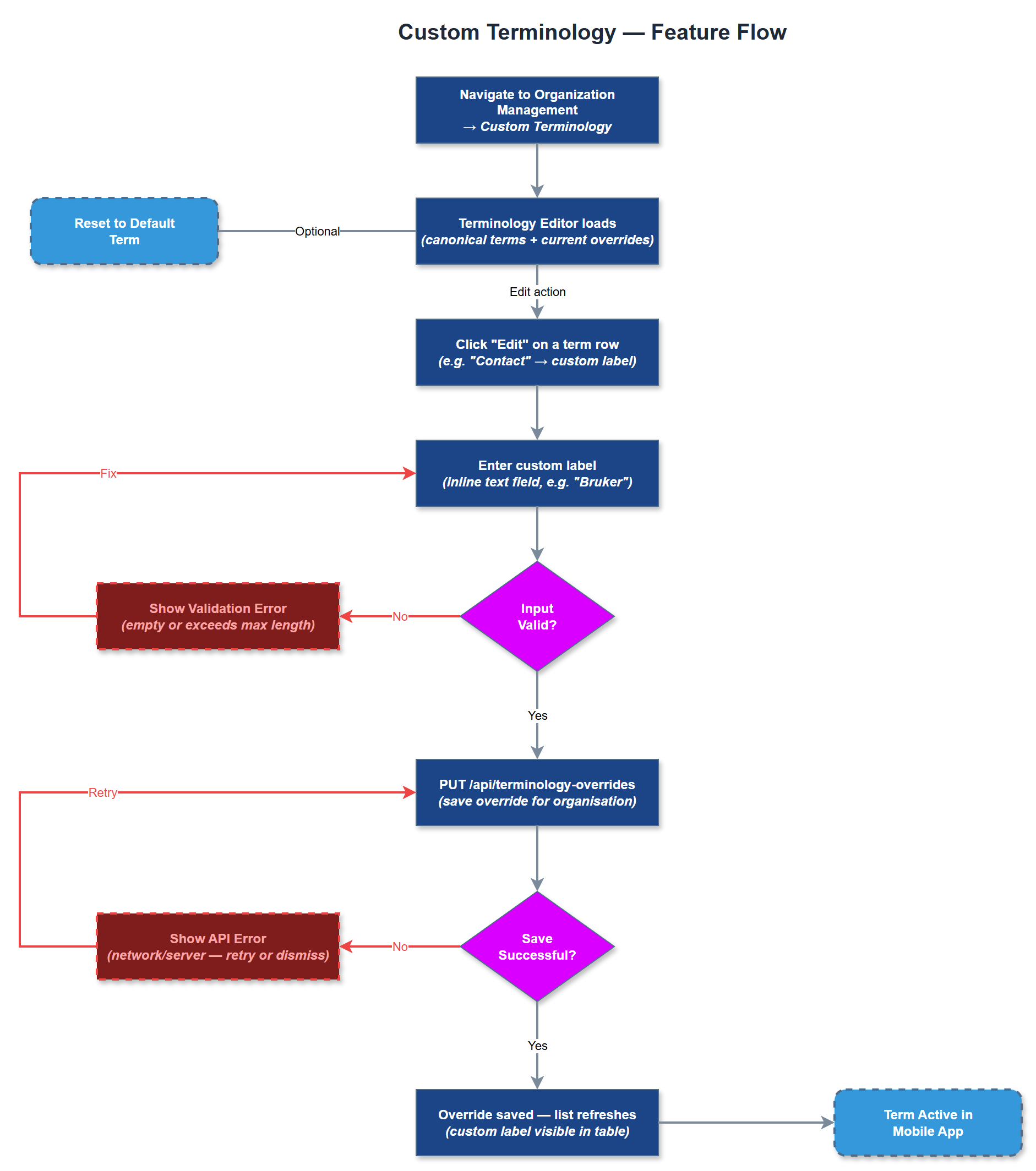
Custom Terminology allows organizations to override the default Meander vocabulary with their own terms throughout the platform. For example, an organization may refer to their volunteers as "støttekontakter" instead of "likepersoner", or use "bruker" instead of "kontakt". These overrides propagate consistently across the mobile app and admin portal, ensuring the platform speaks the language of each organization's culture and regulations. A default fallback to the canonical Meander term is used if no override is defined.
User Flow
Analysis
Peer mentor organizations have deeply established internal vocabularies shaped by years of practice, legal frameworks, and member cultures. Forcing all organizations into a single terminology creates friction, reduces adoption, and signals that the platform does not truly understand their context. Custom terminology removes this barrier by making Meander feel purpose-built for each organization. This is a key differentiator in sales conversations and directly supports the goal of signing multiple diverse organizations onto the platform. Terminology consistency also reduces training overhead since staff and volunteers see labels they already recognize from existing materials.
Terminology overrides are stored in the `terminology_overrides` table linked to the organization. A Terminology Service exposes a lookup API that the mobile app (via REST) and admin portal (via SSR context) use to resolve display labels at render time. The Flutter app fetches the terminology map on login and caches it locally for offline use. The admin portal loads it server-side per request. The Terminology Editor UI provides a table of all overridable terms with their default values, current override (if any), and a text field for editing. Changes are validated to prevent empty overrides. A preview mode shows how the override will appear in key screens before saving.
Components (36)
Shared Components
These components are reused across multiple features
Service Layer (9)
Data Layer (12)
Infrastructure (7)
User Stories
No user stories have been generated for this feature yet.