Custom Reports
Feature Detail
Description
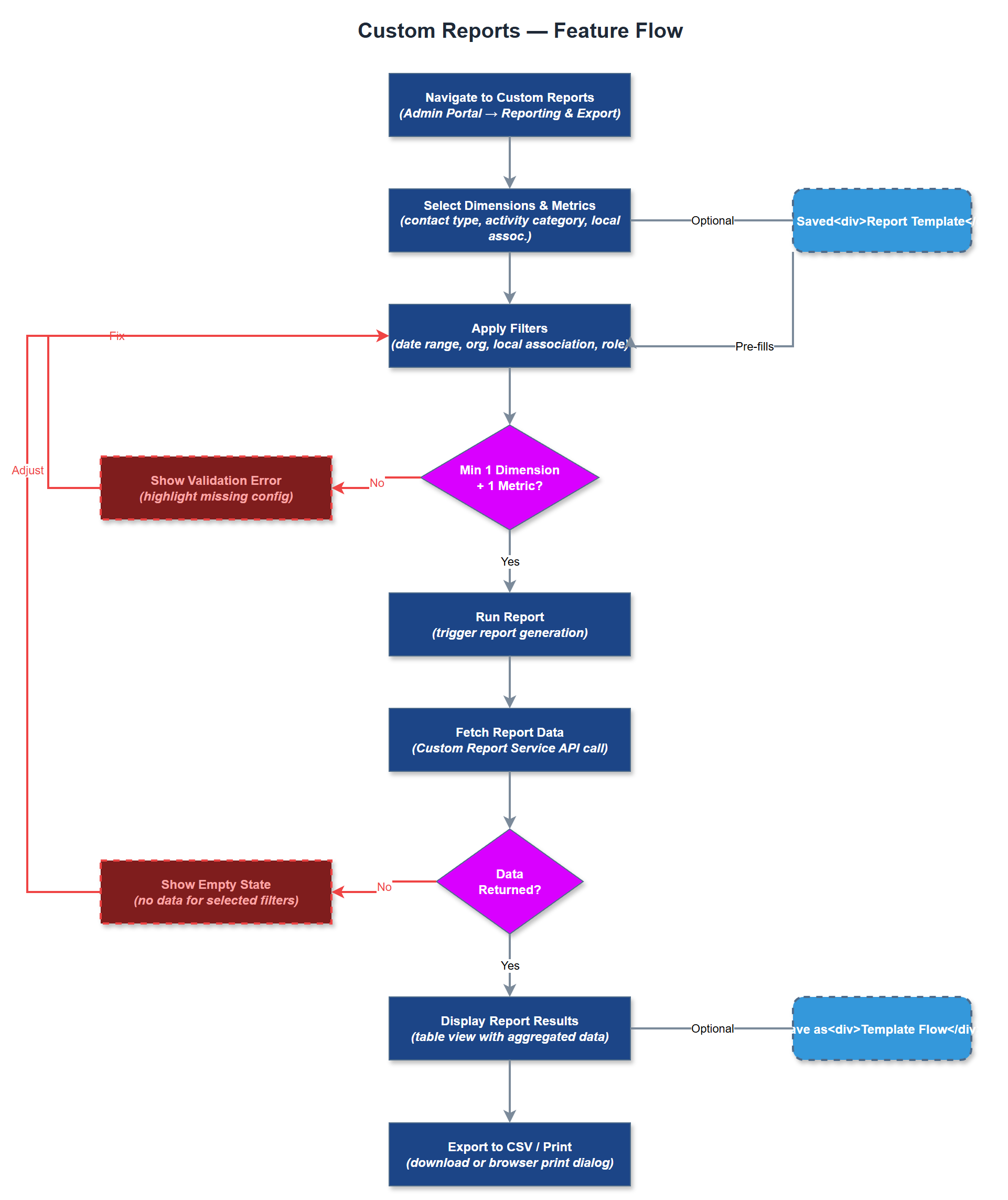
Custom Reports allows organization administrators and coordinators to build ad-hoc reports by selecting dimensions, filters, and metrics from the available activity and user data. Unlike the fixed-format Team Reports and Bufdir Export, Custom Reports gives power users the flexibility to answer organization-specific questions - for example, activities by contact type, engagement rates by local association, or expense totals by activity category. The resulting reports can be saved as templates for recurring use and exported to CSV or printed directly from the browser.
User Flow
Analysis
Organizations have reporting needs that extend beyond Bufdir compliance and internal team oversight. Coordinators may need to analyze engagement by demographic, activity type, or geography for internal planning or board presentations. Org admins may need custom views for local funders, press releases, or strategic reviews. Without custom reporting, these needs are met by exporting raw data and manipulating it manually in Excel - reintroducing the exact administrative burden Meander is designed to eliminate. Custom Reports reduces dependency on technical staff for one-off data requests, empowers non-technical users to answer their own data questions, and positions Meander as a comprehensive operational platform rather than a simple logging tool. This feature is a key differentiator for organizations evaluating the platform against simpler alternatives.
The Custom Report Builder is a Next.js client-rendered page that presents a form-based query builder. Users select dimensions (e.g., activity_type, local_association, user_role, time period) and metrics (count, duration sum, expense total) from dropdowns populated by the REST API. The Custom Report Service translates these selections into parameterized SQL queries against the PostgreSQL database, with strict input validation to prevent injection. Results are returned paginated and rendered in a sortable HTML table. Saved report configurations are stored as JSON in the database linked to the organization, enabling template reuse. CSV export uses the same data pipeline as Team Reports. For MVP of this feature, a drag-and-drop pivot builder is out of scope - a structured form with dropdowns is sufficient. Chart visualization can be added in a subsequent iteration using a lightweight library such as Recharts.
Components (36)
Shared Components
These components are reused across multiple features
Service Layer (9)
Data Layer (12)
Infrastructure (7)
User Stories
No user stories have been generated for this feature yet.