Coordinator Team Reports
Feature Detail
Description
This feature gives coordinators a team-level statistics view showing activity data aggregated across all peer mentors in their local association. Coordinators can monitor team activity levels, identify peer mentors who have been inactive, and review contribution totals for a given reporting period. The report screen provides filterable, sortable summaries per peer mentor and per activity type, giving coordinators the oversight they need without requiring access to the admin portal. Data is scoped strictly to the coordinator's own local association.
User Flow
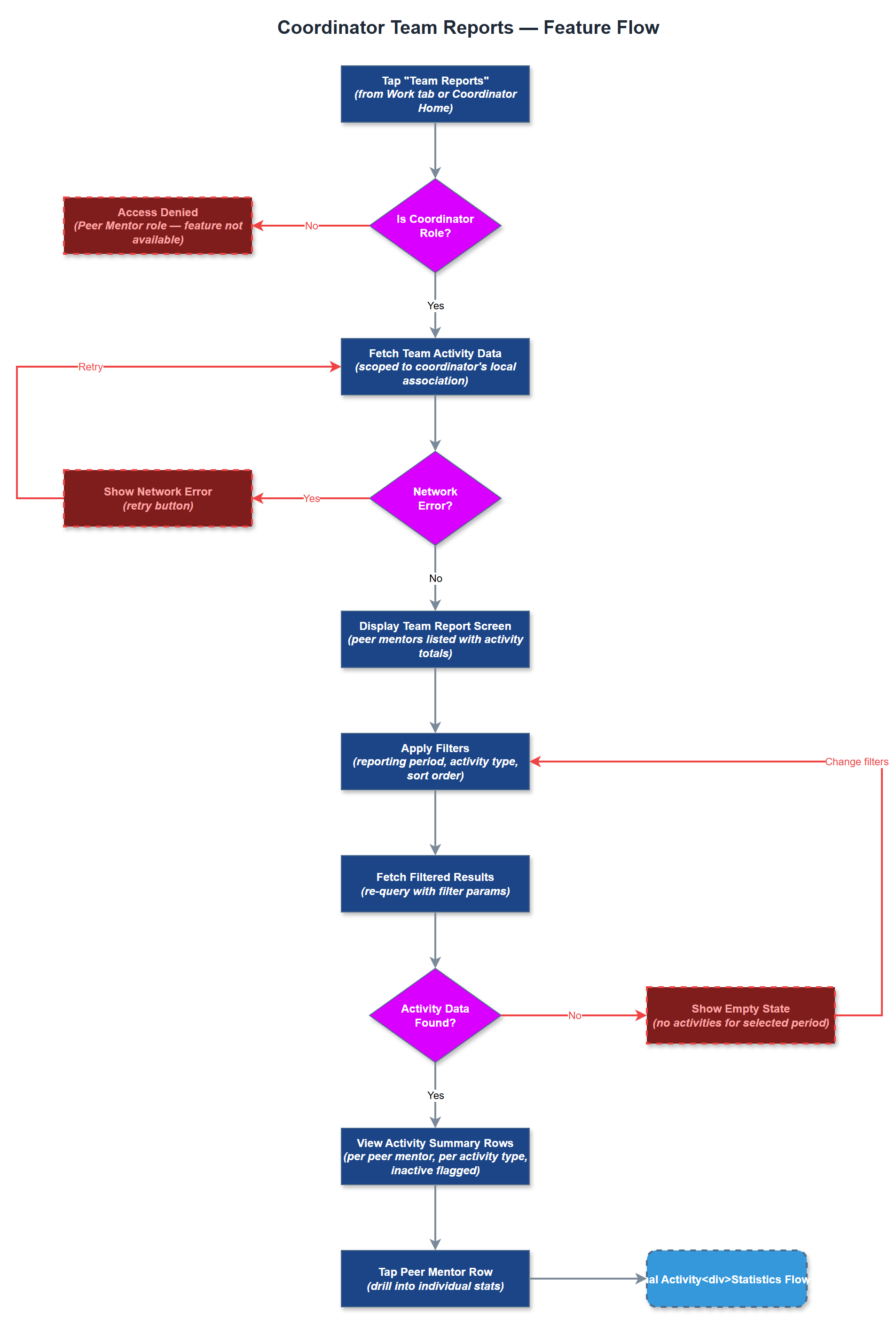
Analysis
Coordinators are the operational backbone of the peer mentor programme, and their effectiveness depends entirely on having timely visibility into team activity. Without this feature, coordinators must rely on manual follow-up calls or spreadsheet aggregation - the exact pain point all three workshop organisations described as unsustainable. By surfacing team statistics directly in the mobile app, coordinators can identify disengaged peer mentors early and intervene before the relationship lapses. This directly reduces administrative overhead, improves programme quality, and strengthens the case for Bufdir reporting accuracy, which is a compliance requirement for continued funding.
The team report service queries the activities table joined with user_roles, scoped to the coordinator's organisation and local association via multi-tenancy filters. Aggregation is performed server-side in PostgreSQL to avoid sending raw activity records to the client. The REST API endpoint returns a pre-aggregated payload per peer mentor (total activities, last active date, breakdown by type) for the selected period. The Flutter UI renders this as a sortable list using Riverpod state management, with drill-down to individual peer mentor summaries. Role enforcement is applied at the API layer - only users with the Coordinator role in the relevant local association can access this endpoint. All list elements must meet WCAG 2.2 AA touch target and contrast requirements.
Components (34)
Shared Components
These components are reused across multiple features
Service Layer (9)
Data Layer (12)
Infrastructure (7)
User Stories
No user stories have been generated for this feature yet.