Contact List & Search
Feature Detail
Description
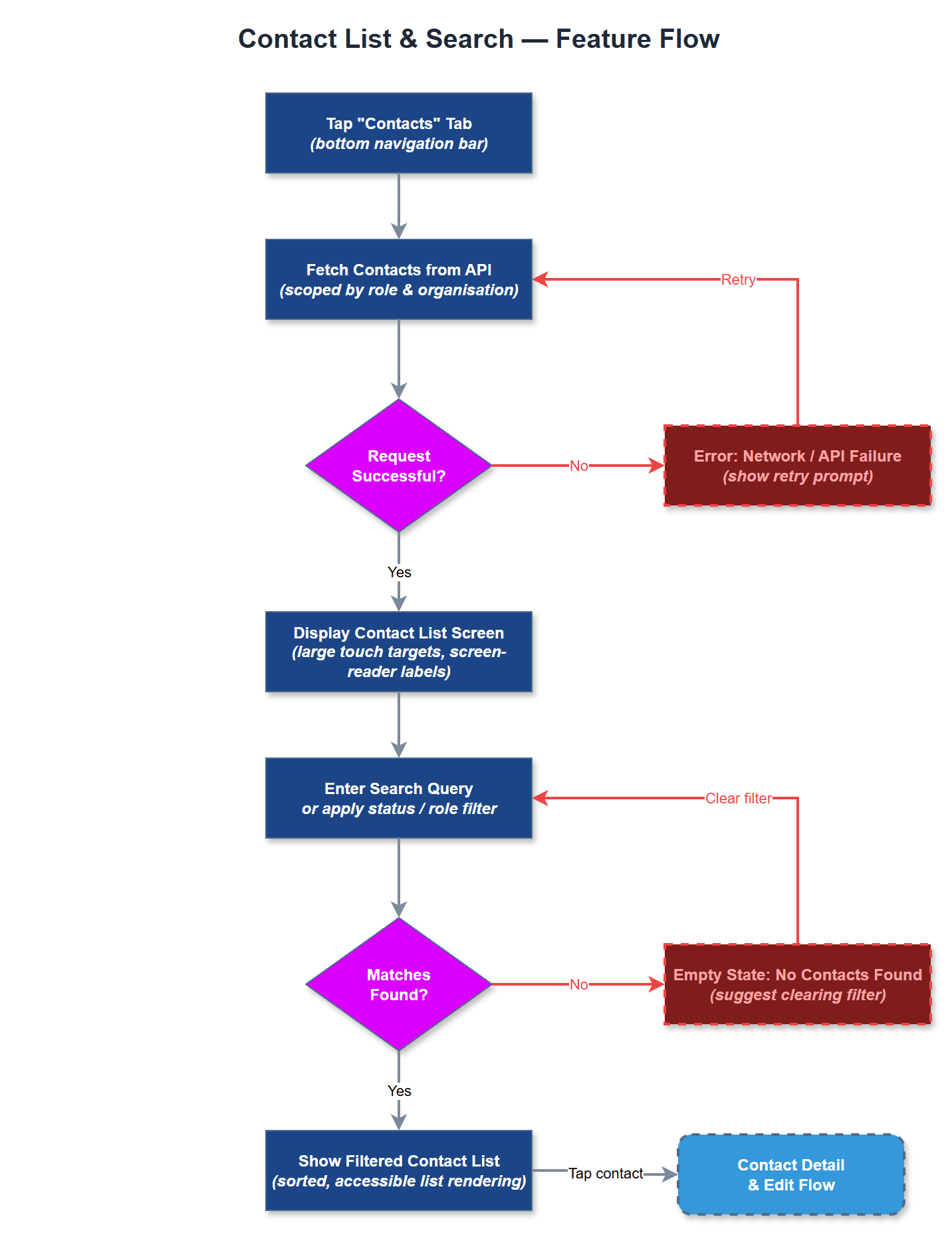
The Contact List & Search feature provides peer mentors and coordinators with a structured, searchable directory of the contacts they support. Users can browse their assigned contacts, filter by status or role, and perform quick searches by name or other identifiers. The list is scoped to the user's organization and role, ensuring coordinators see all contacts within their local association while peer mentors see only their own assigned contacts. The feature is designed for low cognitive load with large touch targets and screen-reader-compatible list rendering in compliance with WCAG 2.2 AA.
User Flow
Analysis
Contact management is foundational to every peer mentor interaction - without a reliable contact list, activity registration, note-taking, and follow-up workflows cannot function. For coordinators, the ability to search across all contacts in their local association is essential for assigning peer mentors, tracking follow-up quality, and identifying gaps in coverage. The feature directly enables the core operational loop (mentor finds contact → logs activity → coordinator oversees) and was consistently flagged across all three workshop organisations as a baseline requirement. Delivering this in MVP ensures the platform is immediately useful from day one and reduces dependency on spreadsheets and Word documents. Proper scoping by role and organisation also enforces the multi-tenancy and data isolation principles that are critical for GDPR compliance across all member organisations.
The contact list is fetched from the REST API (`/api/v1/contacts`) with server-side filtering by organisation and user role applied via JWT claims. Pagination or infinite scroll should be implemented to handle organisations with large contact bases. Search is performed client-side for small lists or via a debounced API query parameter for larger datasets. The Flutter UI uses a `ListView.builder` for efficient rendering and includes a persistent search bar at the top. All list items must meet WCAG 2.2 AA target size requirements (minimum 44×44 logical pixels) and carry semantic labels for VoiceOver/TalkBack compatibility. BLoC manages the search state and list data, with Riverpod providers supplying the contact repository. Local caching via the offline storage layer supports the offline-data-support feature in a later phase.
Components (37)
Shared Components
These components are reused across multiple features
Service Layer (9)
Data Layer (12)
Infrastructure (7)
User Stories
No user stories have been generated for this feature yet.