Contact Detail & Edit
Feature Detail
Description
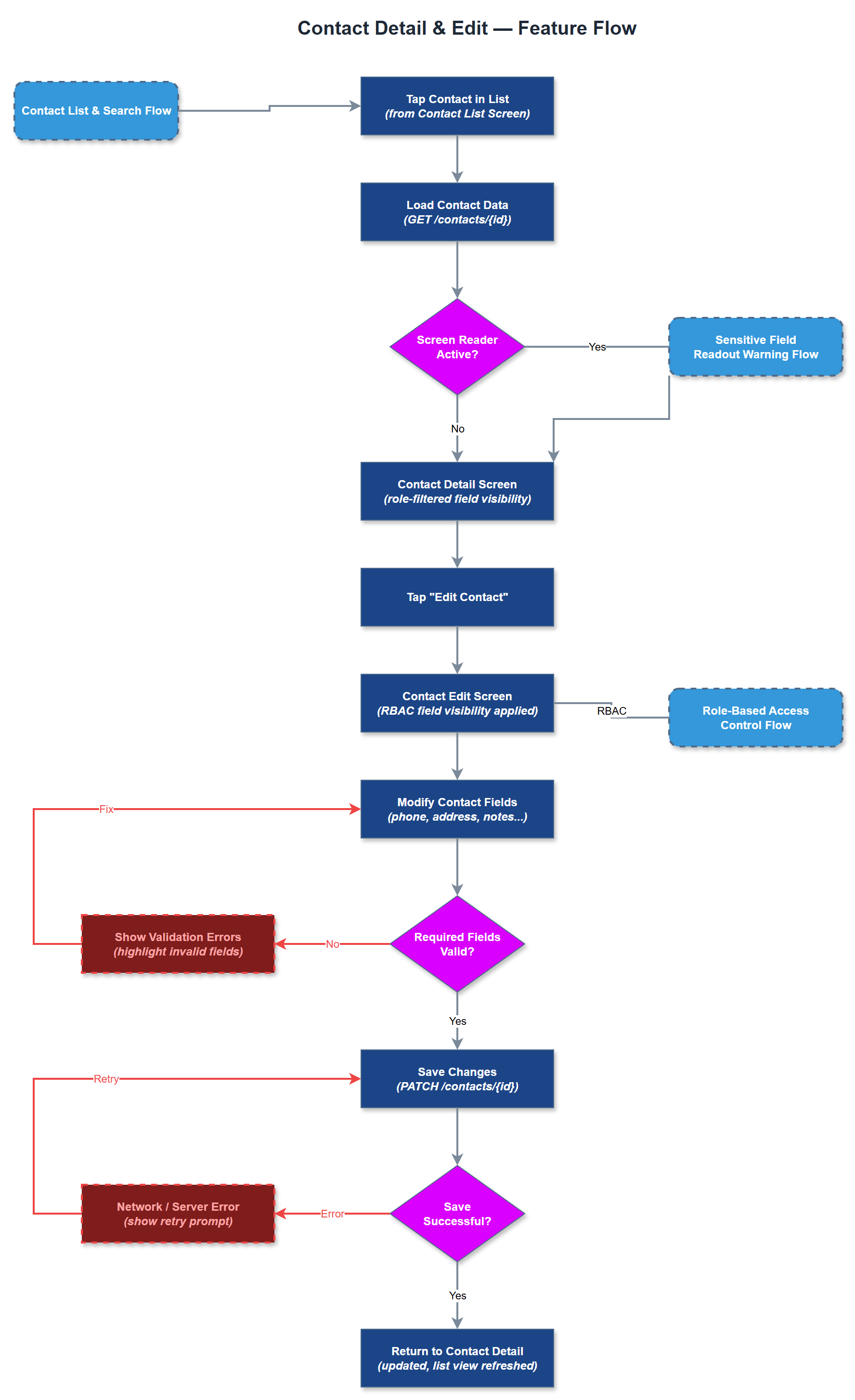
The Contact Detail & Edit feature gives peer mentors and coordinators access to the full profile of an individual contact, including personal information, contact history, assigned peer mentor, and linked activities. From the detail view, authorised users can open an edit form to update contact information such as phone number, address, or notes about the person's situation. Changes are persisted via the REST API and reflected immediately in the list view. The feature enforces role-based field visibility - some sensitive fields are only visible to coordinators - and includes the sensitive field readout warning required for screen reader users handling personal data.
User Flow
Analysis
Maintaining accurate contact information is essential for the quality and continuity of peer mentor support. Outdated phone numbers or addresses directly impede the ability to reach contacts, reducing the effectiveness of the programme and potentially violating duty-of-care obligations. Providing in-app editing eliminates the current reliance on coordinator-managed spreadsheets that are frequently out of sync. For coordinators, the ability to view a contact's full history - activities logged, peer mentor assigned, follow-up status - enables meaningful quality oversight without requiring manual cross-referencing of multiple systems. The sensitive field readout warning is specifically required by NHF to prevent accidental disclosure of personal data when screen readers are active, making this feature also a WCAG compliance enabler.
The detail screen is driven by a single API call to `/api/v1/contacts/:id` returning the full contact object. Role-based field visibility is enforced both on the API (fields omitted from response) and in the Flutter UI (conditional widget rendering). The edit form reuses the same AppTextField and AppButton design tokens as the rest of the app. Validation is performed client-side before submission with clear, accessible error messages as per WCAG 2.2. Optimistic UI updates improve perceived performance; API errors roll back the local state and display a user-facing error. BLoC handles the detail/edit state machine (loading → loaded → editing → saving → saved/error). The sensitive field readout warning widget must wrap any field containing personal identifiers (name, address, phone, ID numbers) to trigger a confirmation dialog when a screen reader is detected as active.
Components (36)
Shared Components
These components are reused across multiple features
Service Layer (9)
Data Layer (12)
Infrastructure (7)
User Stories
No user stories have been generated for this feature yet.