Calendar Sync
Feature Detail
Description
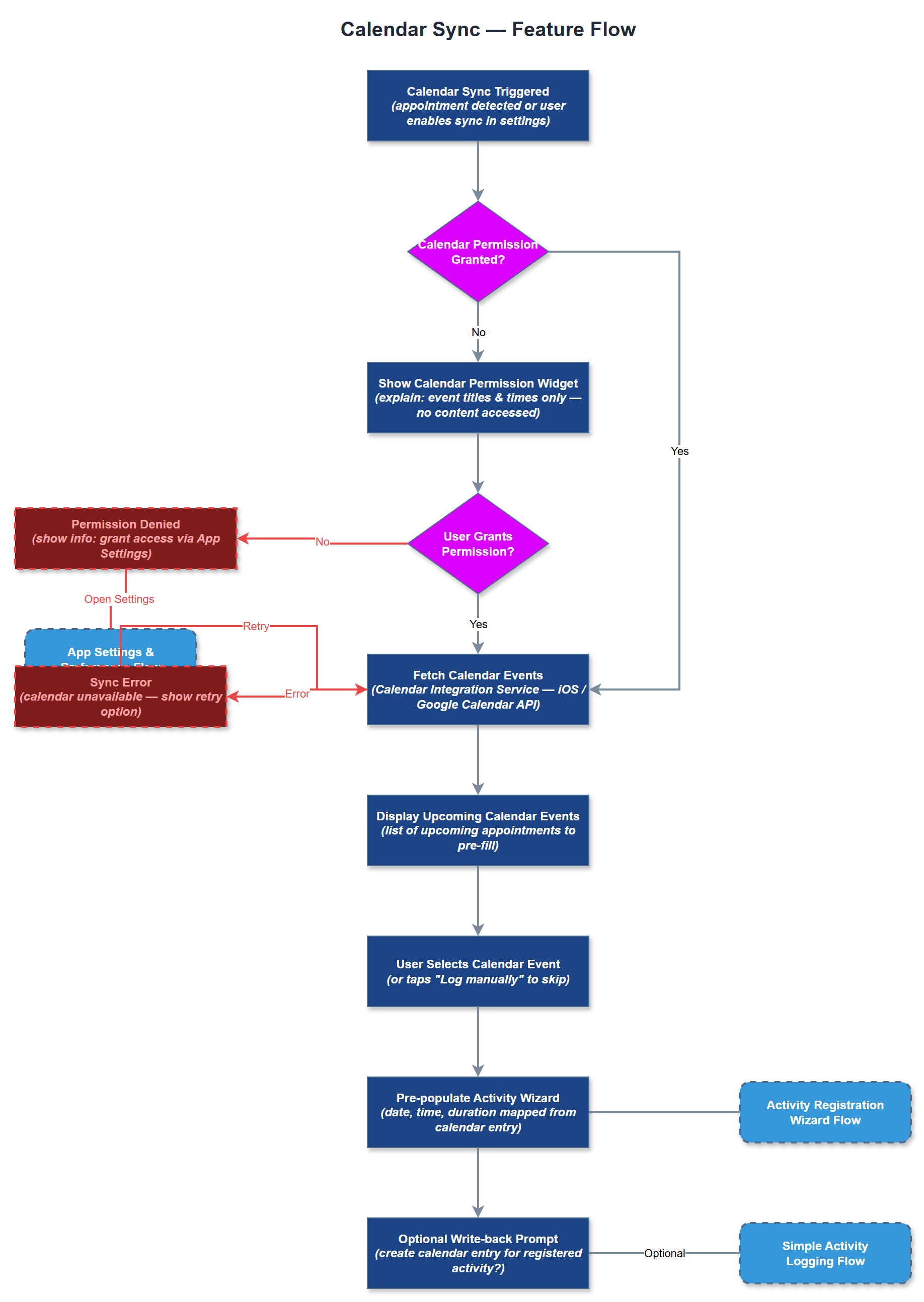
Calendar Sync allows peer mentors to link their device calendar (iOS Calendar / Google Calendar) so that scheduled activities can be pre-populated into the registration wizard and completed appointments can trigger a quick-log prompt. The feature requests only the minimum necessary calendar permission at the point of use, with a clear explanation of what data is accessed. Users can revoke the permission at any time from app settings. The sync is one-way by default (calendar → app) with an optional write-back to create calendar entries from registered activities.
User Flow
Analysis
HLF's workshop surfaced that many peer mentors already plan activities in their personal calendar but then have to re-enter the same data into the reporting system - a duplication of effort that discourages registration. Calendar Sync eliminates this double-entry friction, which is expected to increase registration rates among the segment of users who are comfortable with calendar apps. For coordinators, seeing scheduled activities in context reduces the cognitive overhead of tracking follow-up obligations. This feature also supports the push-notification scenario engine by providing structured scheduling data.
On iOS the Calendar Integration Service uses the EventKit framework via a Flutter platform channel; on Android it uses the ContentResolver calendar API via a method channel. The Calendar Permission Widget handles the permission request lifecycle including the rationale dialog required by both platforms. Fetched calendar events are matched to known contacts using name/email heuristics in the Calendar Integration Service before being surfaced as pre-fill suggestions. No calendar data is sent to the backend; all processing is on-device. The permission state is stored in the Preferences Repository. WCAG 2.2 AA requires the permission dialog to be screen-reader accessible and all calendar event list items to have descriptive labels.
Components (38)
Shared Components
These components are reused across multiple features
Service Layer (9)
Data Layer (12)
Infrastructure (7)
User Stories
No user stories have been generated for this feature yet.