Bulk Actions
Feature Detail
Description
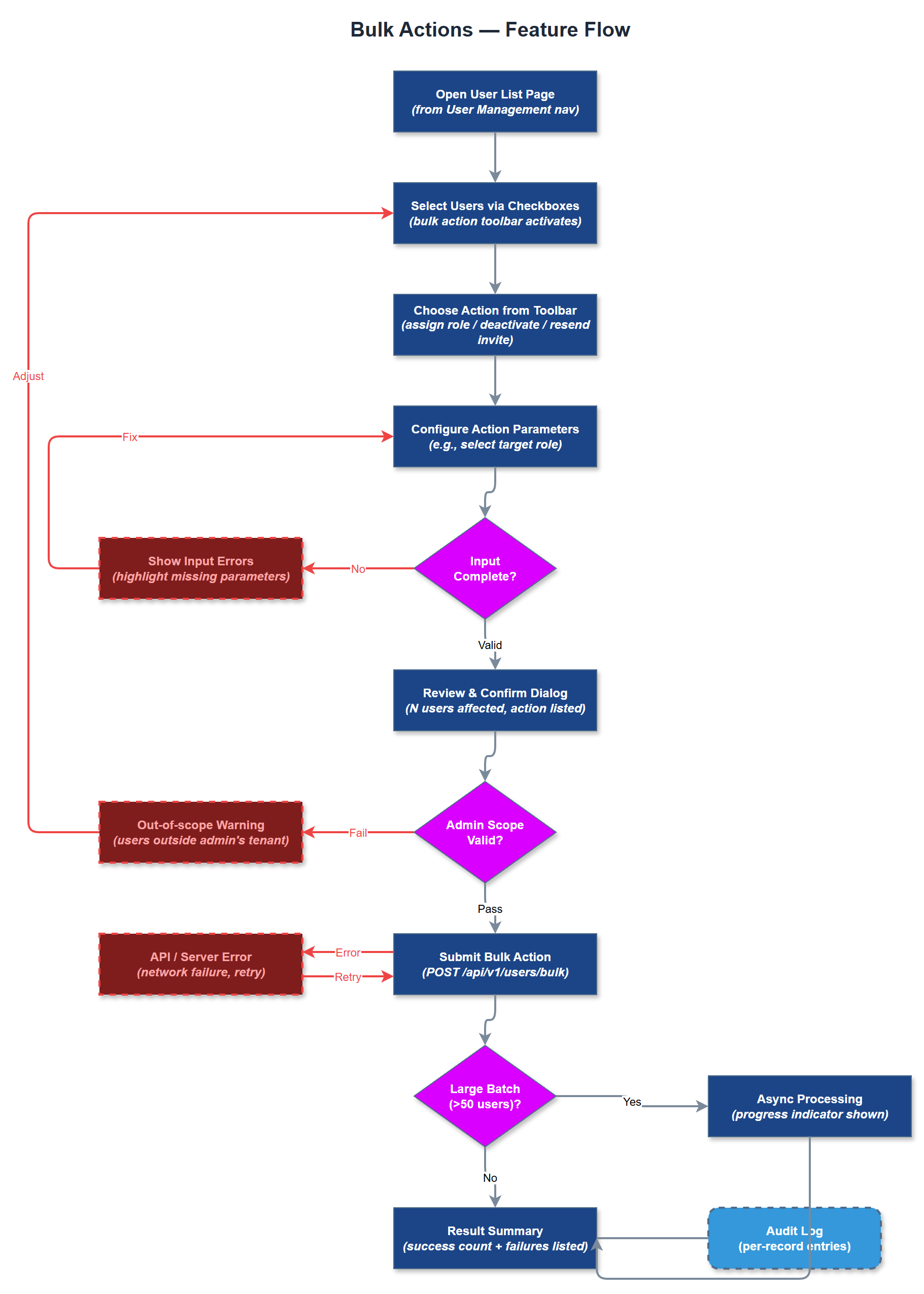
Bulk Actions provides organization administrators with the ability to perform operations on multiple users simultaneously from the user list page. Supported actions include bulk role assignment, bulk deactivation, and bulk invitation resend. Administrators select users via checkboxes, choose an action from a contextual toolbar, configure any action-specific parameters, and confirm before execution. The system processes bulk operations asynchronously for large selections and provides a progress indicator and result summary. The feature is designed for organizations with high volunteer throughput - onboarding a new cohort of peer mentors or deactivating a group of leavers at end of season. Bulk operations respect the same tenancy and permission boundaries as individual operations, and every action in a bulk batch is individually recorded in the audit log to maintain a complete record.
User Flow
Analysis
Organizations onboarding seasonal cohorts of peer mentors - sometimes 20 to 50 at once - cannot realistically perform individual user operations without significant administrative time investment. Bulk actions compress what would be an hour of repetitive clicking into a single confirmed operation, directly reducing the labor cost of platform administration. For coordinators managing end-of-year offboarding or role transitions, the same efficiency gain applies to deactivation workflows. From a data integrity standpoint, performing bulk operations through a single controlled interface with explicit confirmation and atomic audit logging is significantly safer than manual one-by-one edits, which are prone to partial completion if interrupted. The audit trail produced by bulk operations also satisfies compliance requirements for documenting mass access changes, which is relevant for GDPR accountability under Article 30 record-keeping obligations.
Bulk operations are implemented as a server-side batch endpoint (`POST /api/v1/users/bulk`) that accepts an array of user IDs and an action descriptor. The endpoint validates each user ID against the requesting admin's organization before processing, silently skipping any IDs that fail tenancy validation and reporting them in the response summary. Bulk deactivation triggers session invalidation for each affected user via the sessions service. Bulk role assignment reuses the same role assignment validation logic as the individual endpoint, applied in a loop within a single database transaction to ensure atomicity. The frontend toolbar appears conditionally when one or more users are selected. Selection state is managed in React component state with a select-all control that operates on the current filtered/paginated view only. For bulk actions affecting more than 20 users, the API processes asynchronously and returns a job ID; the frontend polls a status endpoint and displays a progress bar. Results are shown in a dismissible summary panel listing success count, skip count, and any validation errors per record.
Components (36)
Shared Components
These components are reused across multiple features
Service Layer (9)
Data Layer (12)
Infrastructure (7)
User Stories
No user stories have been generated for this feature yet.