Booking Confirmation
Feature Detail
Description
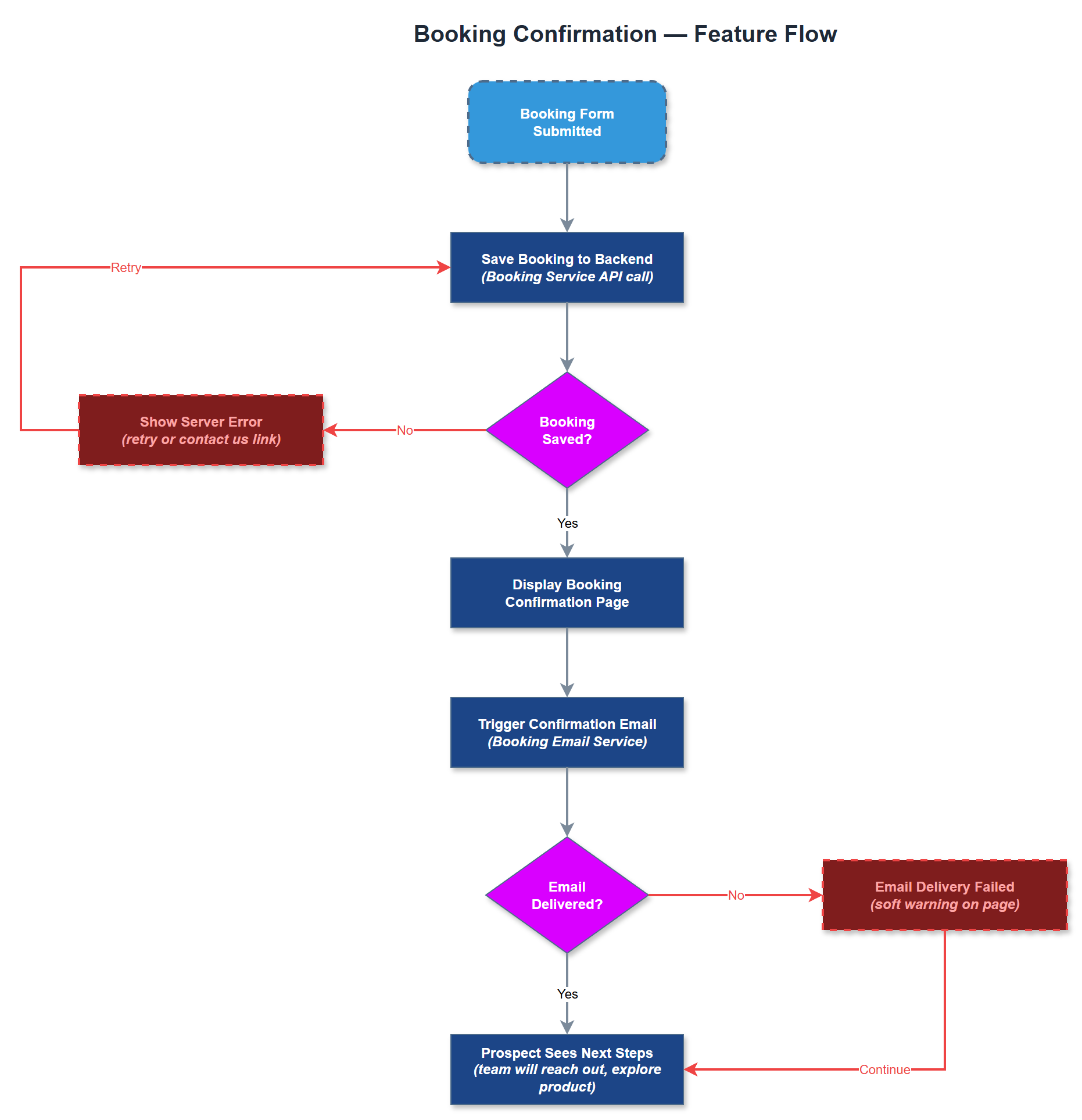
The Booking Confirmation feature delivers a post-submission experience that reassures prospects their demo request was received and sets clear expectations for next steps. It consists of both an on-page confirmation state (or dedicated confirmation page) and a transactional confirmation email sent to the prospect. The feature reinforces the professional brand image of Meander and keeps prospects engaged while the sales team prepares for outreach. It transforms a transactional form submission into a trust-building touchpoint in the sales funnel.
User Flow
Analysis
Confirmation communication is a critical trust signal in B2B sales. Prospects who submit a demo request are often evaluating multiple solutions simultaneously; a prompt, professional confirmation email and clear on-page feedback reduces doubt and prevents drop-off. The email serves as a persistent record of the interaction that prospects can forward internally to stakeholders, extending the reach of the sales message. It also sets response time expectations, reducing inbound support inquiries about whether the form was received. Operationally, the confirmation email can include calendar links or scheduling tools to accelerate the booking process and reduce sales cycle length.
The confirmation page or on-page success state should be rendered after successful form submission, displaying a thank-you message, summary of submitted details, and expected response timeframe. The booking confirmation email should be sent via a transactional email service (e.g., Resend, SendGrid, or Postmark) from a Next.js API route triggered on successful form save. The email template should be HTML-based with a plain-text fallback, include the organization name and contact details submitted, and contain a clear next-steps message. Email deliverability should be verified with SPF/DKIM records. The on-page confirmation must be accessible - focus should move to the success message on form submission, and the message must be announced to screen readers via ARIA live regions.
Components (34)
Shared Components
These components are reused across multiple features
Service Layer (9)
Data Layer (12)
Infrastructure (7)
User Stories
No user stories have been generated for this feature yet.