Auto-Approval Rules
Feature Detail
Description
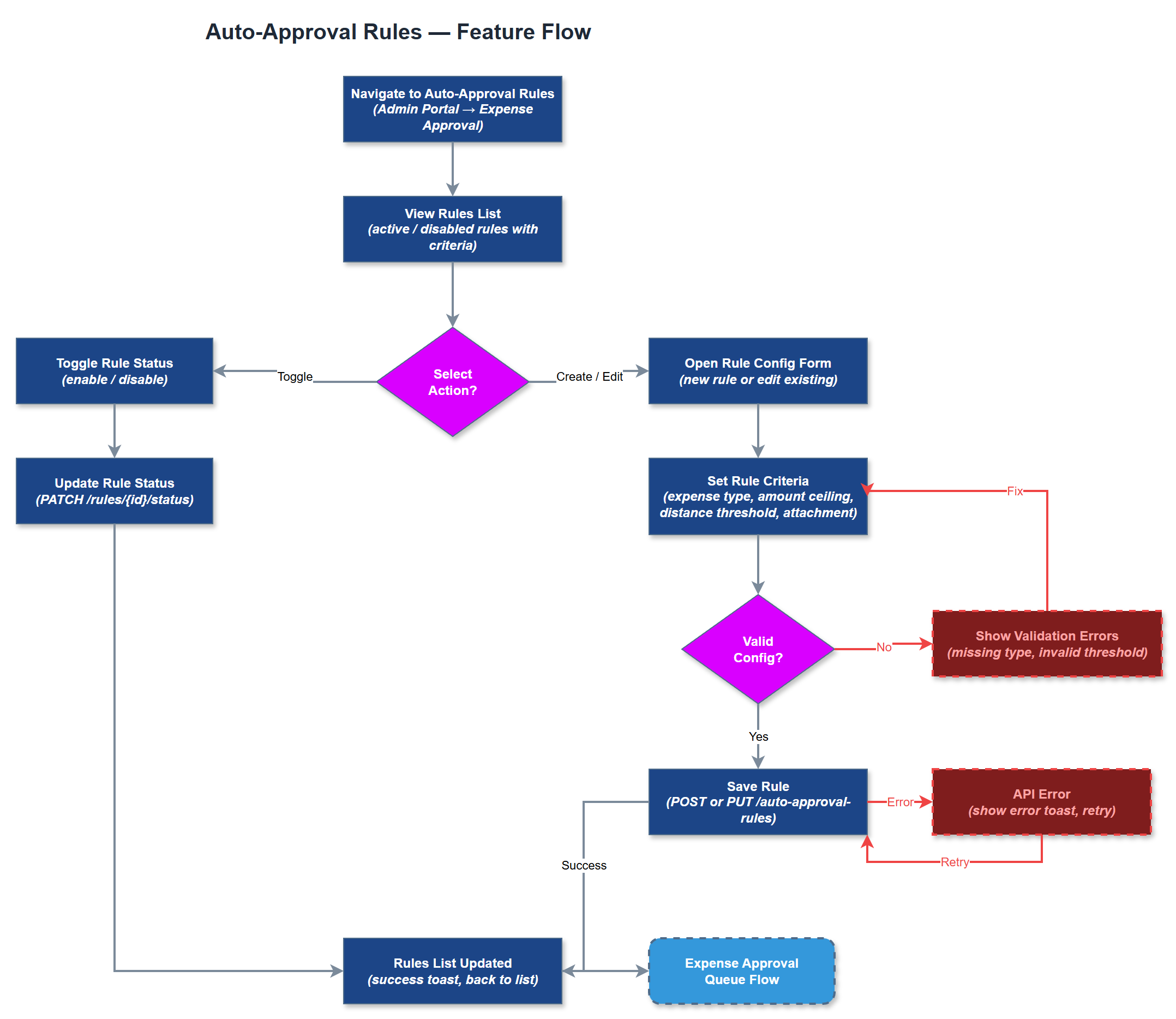
Auto-Approval Rules allow organization administrators to configure threshold-based criteria under which expense claims are automatically approved without manual review. Rules can be defined by expense type, distance threshold, amount ceiling, and presence of attachments - for example, automatically approving mileage claims under 50 km with no additional expenses, or any claim under a defined monetary threshold with a valid receipt. Claims matching configured rules bypass the manual queue entirely, while edge cases and exceptions are routed to the standard approval queue. Administrators can view, create, edit, and disable rules through a dedicated configuration interface in the admin portal.
User Flow
Analysis
A large share of expense claims - particularly short-distance mileage without additional costs - are straightforward and require no human judgment. Requiring manual review for every such claim creates unnecessary bottlenecks and wastes coordinator time on low-risk, low-value decisions. Auto-approval rules eliminate this overhead by handling routine claims instantly, reducing reimbursement turnaround from days to seconds for eligible claims. This has a direct positive effect on volunteer satisfaction, as faster reimbursements reduce the financial friction of volunteering. For organizations with high activity volumes, such as HLF's peer mentors with hundreds of annual registrations, this feature is critical to making the expense workflow operationally sustainable without scaling coordinator headcount.
Auto-approval logic is evaluated server-side at the point of expense submission, before the claim is inserted into the approval queue. Rules are stored in a dedicated configuration table linked to the organization, with fields for expense_type_id, max_amount, max_distance_km, require_receipt, and is_active. The evaluation engine checks all active rules for the submitting user's organization in priority order and short-circuits on the first match. Matched claims are written directly to reimbursement_approvals with an auto-approved status and a system actor ID. The admin rule configuration page is a Next.js SSR page with a form-driven rule builder, input validation, and a preview of which recent claims would have matched each rule. Audit log entries are created for all auto-approval events to support compliance review.
Components (35)
Shared Components
These components are reused across multiple features
Service Layer (9)
Data Layer (12)
Infrastructure (7)
User Stories
No user stories have been generated for this feature yet.