Authentication Methods (Passkeys)
Feature Detail
Description
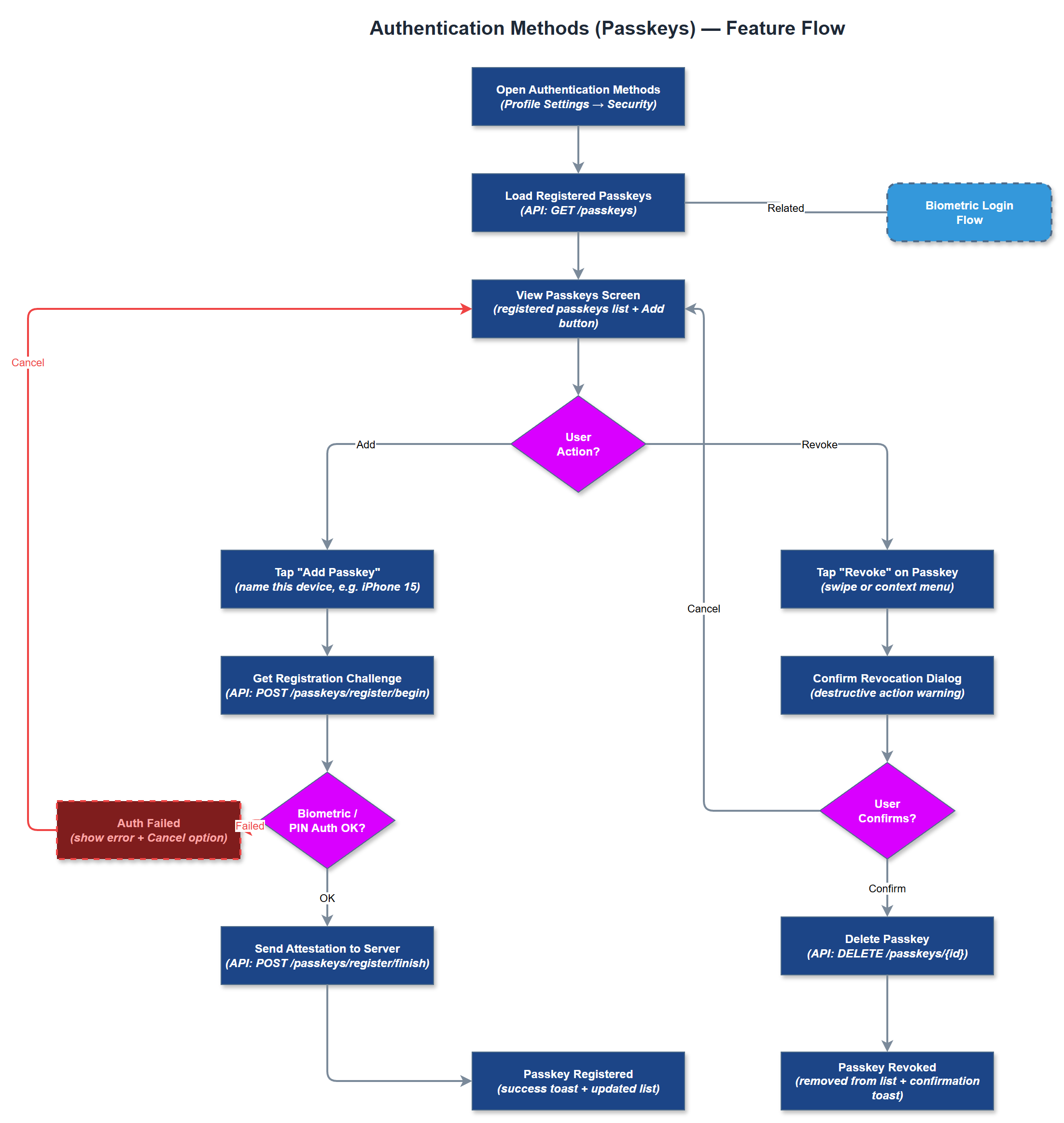
This feature allows users to register and manage passkeys as an additional or primary authentication method for the Meander Mobile App. Passkeys use device-bound cryptographic credentials (FIDO2/WebAuthn standard) stored in the device's secure enclave, providing phishing-resistant authentication without requiring a password. Users can register multiple passkeys (e.g., across devices), view registered passkeys, and revoke individual passkeys from their account settings. This feature complements the existing biometric login by providing a standards-based credential that can work across device replacements and organizational onboarding flows.
User Flow
Analysis
Passkeys represent the modern standard for secure, user-friendly authentication and are increasingly expected by enterprise and public-sector customers. For Meander's target audience - which includes users with varying digital literacy - passkeys eliminate password fatigue and reduce account recovery support requests. For organizations handling sensitive personal data (encrypted assignments, health-related contacts), passkeys provide stronger authentication guarantees than passwords while being easier to use than BankID for day-to-day access. Adoption of passkeys signals platform maturity to prospective organizational buyers and aligns with Norwegian public sector digital security expectations, supporting the sales website's compliance messaging.
Implement using the FIDO2/WebAuthn standard via Flutter's local_auth and a WebAuthn-compatible backend endpoint. The Passkey Service handles credential creation (navigator.credentials.create equivalent via platform API), storage of public key material server-side in a dedicated credentials table linked to the users table, and assertion verification on login. The Passkey Setup Screen should guide users through device capability detection, registration flow, and confirmation. The backend must implement challenge-response nonce management to prevent replay attacks. Fallback to email/password must always be available in case passkey authentication fails or the device changes. Ensure the implementation is tested against iOS (Face ID + passkey) and Android (fingerprint + passkey) device configurations.
Components (37)
Shared Components
These components are reused across multiple features
Service Layer (9)
Data Layer (12)
Infrastructure (7)
User Stories
No user stories have been generated for this feature yet.