Assignment Threshold Tracking
Feature Detail
Description
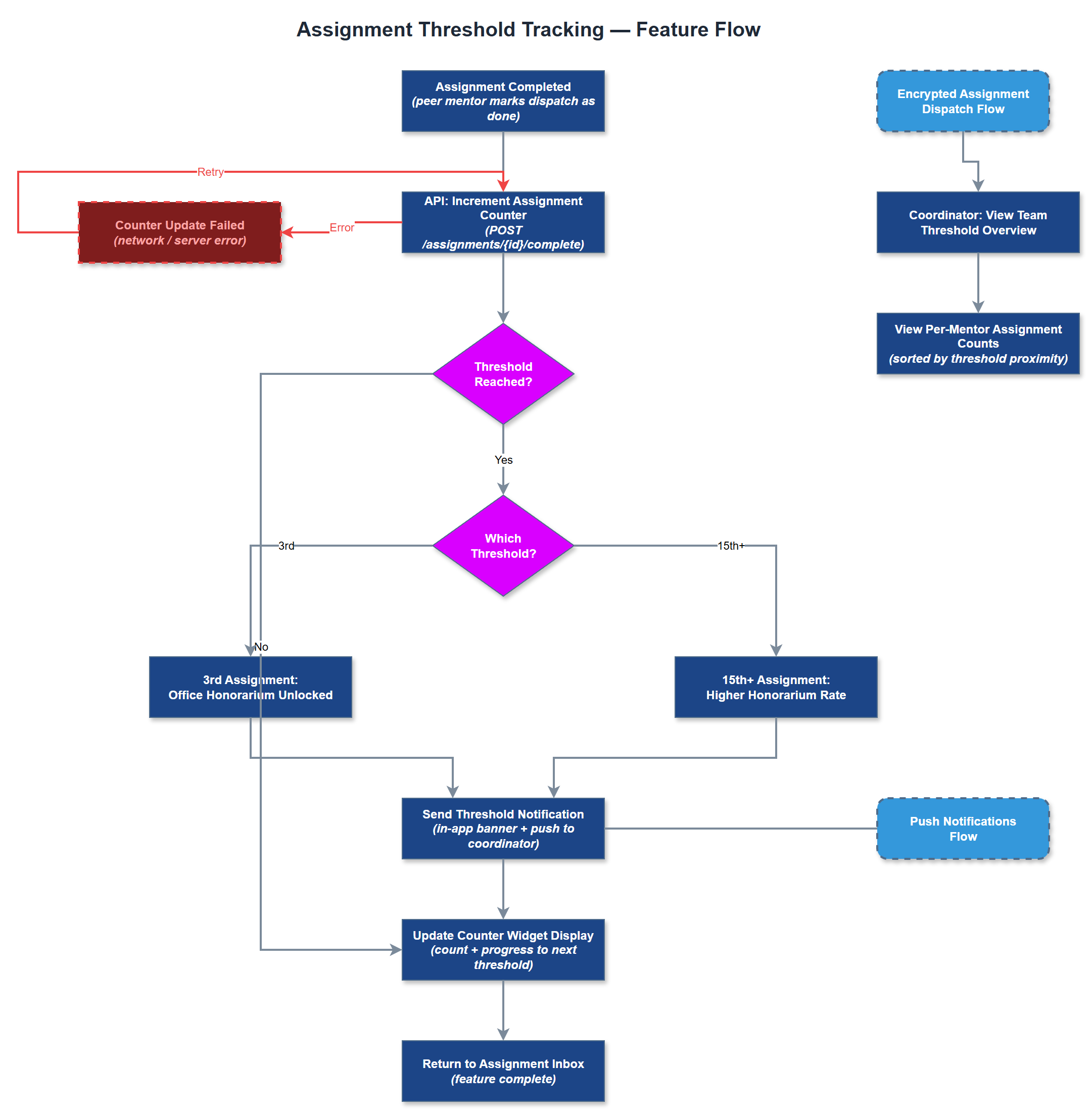
This feature tracks the cumulative number of encrypted assignments completed by each peer mentor and triggers tiered honorarium payments at defined thresholds. For Blindeforbundet, an office honorarium is unlocked at the 3rd completed assignment and a higher rate applies from the 15th assignment onward. A counter widget is displayed to the peer mentor so they can see their progress toward the next threshold. Coordinators can view the same counts in their oversight screens to plan workload and budget for honorarium payouts.
User Flow
Analysis
Honorarium thresholds are a formal contractual commitment between organisations and their peer mentors. Without automated tracking, coordinators must manually count completed assignments from spreadsheets or paper records - a process that is error-prone and time-consuming, and that occasionally results in peer mentors being underpaid or overpaid. Automating threshold detection removes administrative burden from coordinators, ensures peer mentors are compensated correctly and on time, and creates an auditable trail that satisfies internal finance controls. The visible counter also serves as a lightweight motivational mechanism, encouraging peer mentors to continue taking assignments.
The threshold configuration (e.g. threshold_1 = 3, threshold_2 = 15, rate_1 = X, rate_2 = Y) should be stored in organization_settings or a dedicated assignment_thresholds table so it is configurable per organisation without code changes. The Threshold Tracking Service queries the assignment_status_logs table to count assignments with status 'completed' per peer mentor. Threshold events are emitted when a count crosses a boundary and can trigger a notification and an entry in an honorarium log. The Assignment Counter Widget in Flutter consumes the count via BLoC state; it should be lightweight and accessible, showing current count, next threshold, and delta remaining. The REST API exposes a read endpoint for the count; write (status update) is handled by the assignment dispatch flow.
Components (37)
Shared Components
These components are reused across multiple features
Service Layer (9)
Data Layer (12)
Infrastructure (7)
User Stories
No user stories have been generated for this feature yet.