App Settings & Preferences
Feature Detail
Description
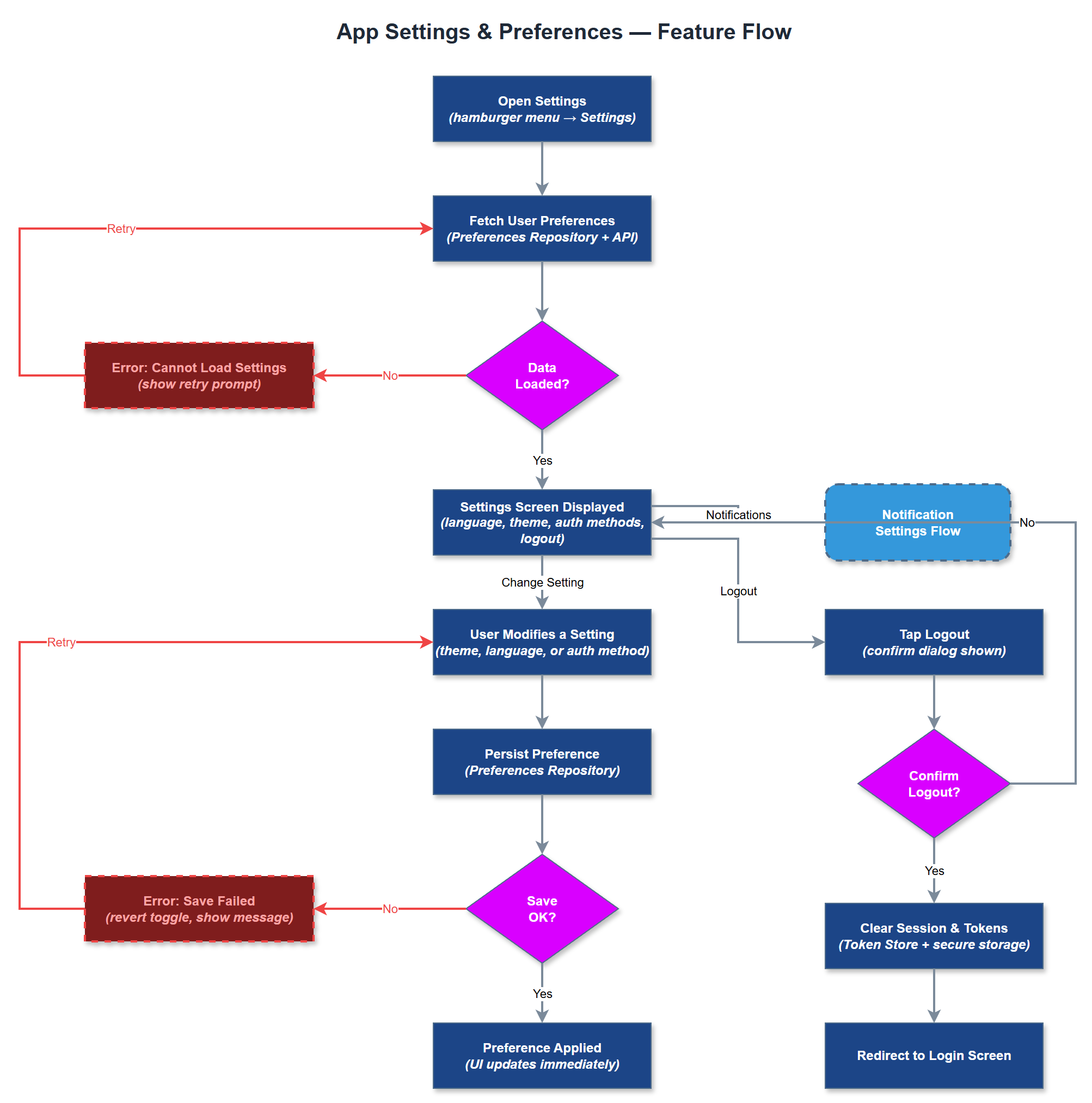
App Settings & Preferences provides users with a centralized screen to configure personal application behavior, including notification preferences, language settings, theme options, and account-level controls such as linked authentication methods. Accessible from the hamburger menu, this screen acts as the primary self-service configuration point for the app experience. It surfaces controls that are user-scoped rather than organization-scoped, clearly separating personal preferences from administrator-controlled organization settings. The settings screen also provides entry points to privacy policy, accessibility statement, and account management actions such as logout and session termination. It is designed with progressive disclosure so that infrequently used options do not clutter the primary interface.
User Flow
Analysis
User-controlled preferences are a baseline expectation for any production mobile application and directly affect user satisfaction and retention. Allowing users to manage notification preferences reduces opt-out rates from push notifications, which are critical for assignment dispatch and coordinator alerts. Language and accessibility settings support the platform's WCAG 2.2 AA commitment by enabling users to configure text size and contrast options. Providing a clear logout and session management flow is also a security and compliance requirement, particularly given the sensitive nature of the data handled (personal health information, assignments). Without this screen, users lack agency over their experience, increasing frustration and support tickets during the pilot phase.
Implement as a stateful Flutter screen mounted from the hamburger menu overlay. Persist preferences using a combination of secure local storage (flutter_secure_storage for sensitive values like auth tokens) and the REST API (`/api/v1/users/preferences`) for preferences that should sync across devices. Use Riverpod for preference state management so that changes propagate reactively to affected widgets (e.g., notification badge behavior) without requiring a full app restart. Notification preference toggles should call the notification preferences API endpoint and update DeviceToken records accordingly. The logout action must clear all local storage, invalidate the JWT on the server, and navigate to the login screen with the navigation stack cleared. Ensure all form controls use semantic labels for screen reader compatibility. Keep the settings list flat and scannable - avoid nested sub-screens for MVP.
Components (34)
Shared Components
These components are reused across multiple features
Service Layer (9)
Data Layer (12)
Infrastructure (7)
User Stories
No user stories have been generated for this feature yet.