Achievement Badges
Feature Detail
Description
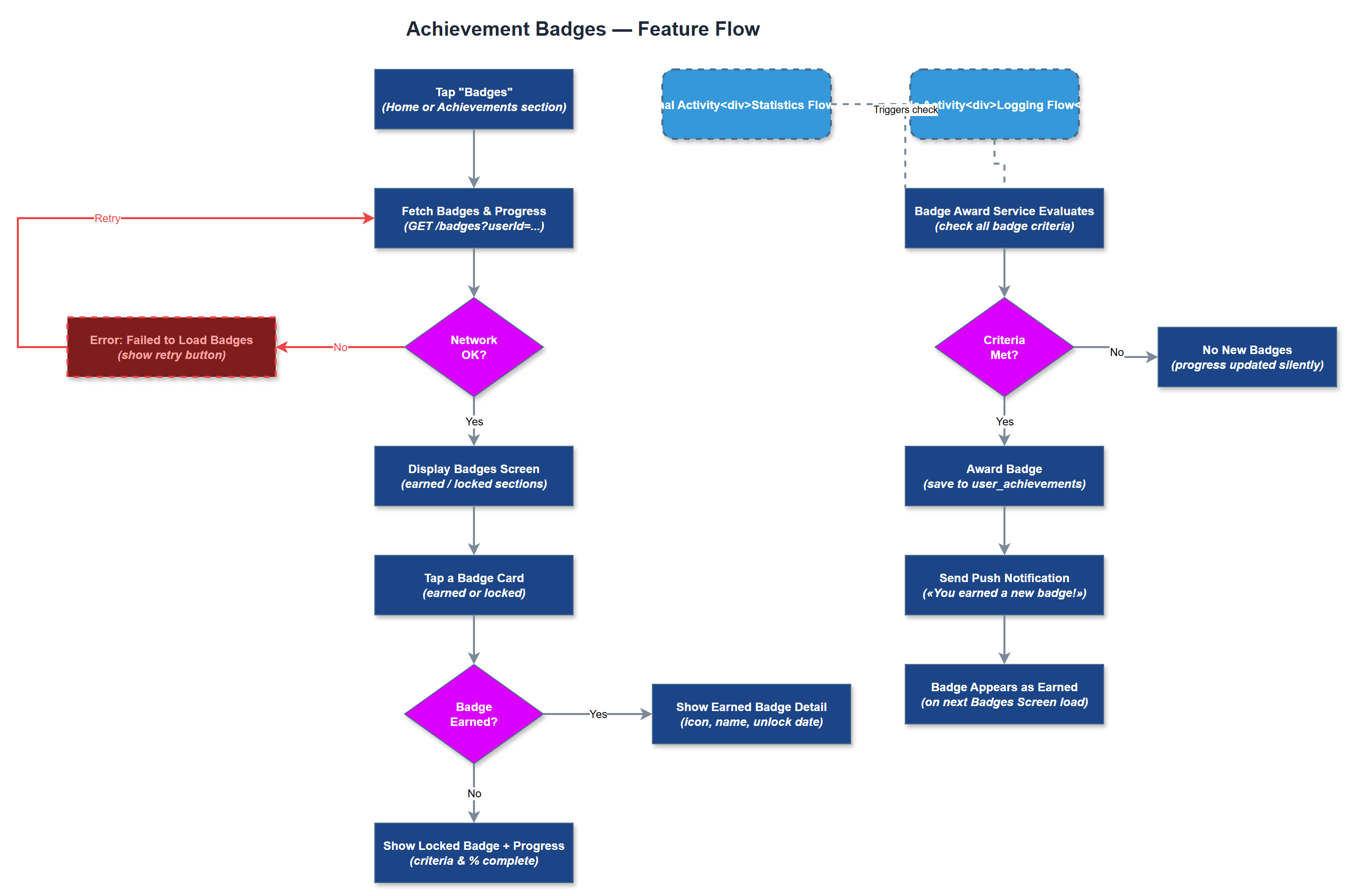
Achievement Badges is a gamification feature that awards peer mentors digital badges for reaching specific milestones in their volunteer activity. Badges are triggered automatically based on data already collected in the system, such as number of activities logged, consecutive weeks active, types of contacts supported, or courses completed. Each badge has a name, icon, description, and unlock criteria. The Badges Screen displays earned and locked badges, providing a visible progression system that encourages continued engagement. Coordinators and organization admins can view badge progress for their peer mentors as part of oversight and motivation tracking.
User Flow
Analysis
Badge systems are a well-documented mechanism for sustaining volunteer engagement by providing short-term motivational checkpoints alongside longer-term goals. For peer mentor organizations, where volunteer churn is a significant operational risk, a visible progression system creates additional reasons to keep logging activities consistently. NHF and HLF both referenced the desire for status recognition mechanics, and badges directly address this by making achievements concrete and visible. From a data perspective, badge unlock events also serve as lightweight engagement signals that organizations can monitor to identify at-risk or highly engaged volunteers, informing coordinator outreach and support strategies.
The backend requires an achievements table and a user_achievements join table to track which badges each user has earned and when. Badge evaluation logic should run as a server-side event triggered after each activity save, course enrollment completion, or certification award - avoiding expensive full-table scans. Badge criteria should be defined in a configuration-driven manner (JSON or database rows) so new badges can be added without code deployments. The Flutter Badges Screen should differentiate earned badges (full color, unlock date) from locked badges (greyed out, unlock criteria visible). Push notifications should be sent upon badge unlock using the existing push notification infrastructure. All badge icons must meet WCAG contrast requirements and include descriptive alt text for screen reader compatibility.
Components (38)
Shared Components
These components are reused across multiple features
Service Layer (9)
Data Layer (12)
Infrastructure (7)
User Stories
No user stories have been generated for this feature yet.